Upstreams on Pantheon
Introduction
Learn how to use upstreams to free up developer time.
Benefits
Standardize design and functionality across many sites
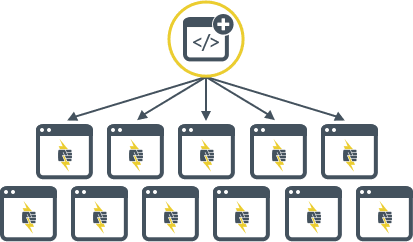
Upstreams act as a scaffold for new sites, allowing developers and site owners of any skill level to kickoff projects at warp speed.
Instead of repeating the same technical work on each individual site, you can build and maintain a common user interface with unified branding and functionality once, in a single source.
Efficient update strategy
The upstream workflow frees up developer time, and establishes a sustainable and scalable process for handling updates across massive site portfolios.
New features and functionality can be continuously developed in the upstream repository, then distributed to each site, where they can be applied with a single click by site owners.
See how Forum One uses this process to build, launch, and manage nearly 200 satellite sites for Fairfax County Public Schools in this case study.
Scale client services
Spend less time doing non-core activities and reclaim lost billable hours where it counts most. Upstreams help improve support efficiency by empowering non-technical clients and junior developers to handle lower-level support issues, such as creating a new site or applying updates. This gives advanced developers more time to focus on higher-level support work and new features.
Hear from Kalamuna how this process liberates developers and empowers newbies to provide ridiculously awesome support in this case study.
Workflow overview
There are three levels of repositories in play here, and updates flow "downstream" from one level to another.

- Core Updates
Level 1: Pantheon's Core Upstream
The top level repository will be one of Pantheon's core upstreams (either WordPress,Drupal (Latest Version), or Drupal 7). Core upstream updates are distributed by Pantheon and must be applied downstream.

- Parent Theme
- Common plugins / Contrib modules
Level 2: Your Upstream
The second level repository is your upstream. This is where core updates from Pantheon are pulled in and modifications to your common codebase are distributed (for example, parent theme and plugin/module version updates).
The upstream repository is hosted outside of Pantheon using a provider like GitHub, Bitbucket, or GitLab. The upstream repository is connected to Pantheon and associated with your organization, allowing fellow team members the option to select this repository as a starting point when creating new sites.
To create an upstream from another Git hosting provider (like Azure DevOps or a self-hosted Bitbucket server), contact support.

- Child Theme
- Site-specific plugins / Custom code
Level 3: Site repository
Core updates and changes to the common codebase make their way down to the site repository for each site that uses the upstream.
The site repository allows separation between common code across all sites, tracked in the upstream, and site specific customizations, tracked in each individual site. This facilitates rolling out updates quickly and easily.
Upstreams for digital agencies and Pantheon resellers
Visit the Agency Partner Program page or download the Agency Partner Program Guide to learn more about becoming an Agency Partner. All agency partners can create their own upstreams.
Upstreams for corporate and higher education customers
Creating your own upstream is included for Pantheon Enterprise Gold Accounts and higher, and all Pantheon EDU accounts. You can learn more by reaching out to our accounts team using the forms on the pages linked here.
Support for upstreams requires that the externally hosted upstream repository is connected to the platform correctly. For details, see Get Support. Refer to Composer Fundamentals and Workflows if you are considering a Composer based workflow.
Terminology
Here are definitions for commonly used terms:
Upstream
An upstream is a repository that acts as a parent for another repository. Pantheon maintains core upstreams (WordPress, Drupal (Latest Version), Drupal 7). An upstream you create is restricted to members of an organization, contains a common codebase for new sites, is a child repository of one of Pantheon's core upstreams, and acts as a parent for site level repositories.
Public Upstream
A public upstream is a repository that is open to all Pantheon users which contains a common codebase for new sites, like Panopoly.
Repository
Arepository is a collection of files packaged in a single directory under version control.
Remote repository
A remote repository is the central version control location, such as a repository residing on GitHub, Bitbucket, or GitLab.
Upstream updates
Upstream Updates are code changes that are made once in a parent (upstream) repository, then applied "downstream" to child repositories. This is how Pantheon's one-click updates work.
Site repository
A site repository is a child repository where upstream updates are applied and site specific customizations are tracked, similar to your site's codebase on Pantheon.
Framework
The framework determines the server configuration for a given CMS. It includes things like Nginx configuration, the relevant CLI tool to install (Drush or WP-CLI), etc. This setting is visible to users via Terminus and in the Site Settings. Once a framework has been set, it cannot be changed at the site level through the UI or Terminus. If you need to change your upstream's framework, you would need to contact Support.