
Pantheon release notes

Your destination for staying informed about our latest innovations and product updates.
Subscribe to RSS feed

Content Publisher
November 4, 2026

Version 1.4.3 of the Pantheon Content Publisher WordPress plugin is now available.

What's new?

  • Smoother video previews — Embedded videos no longer reload or flicker in the real-time preview every time you make an edit.
  • Fresher preview links — Preview links now always show your latest content instead of a cached, out-of-date version.
  • More reliable Smart Components — All Smart Components on the page, not just videos, now stay visible in the real-time preview as you keep editing.
  • Clearer preview errors — If the real-time preview can't load your latest edits, you'll see a clear error message instead of outdated content.

Update to 1.4.3 from the WordPress dashboard under Plugins > Installed Plugins, or download it from the WordPress Plugin Repository.

For more details, see the plugin changelog.
September 30, 2026

Version 1.4.1 of the Pantheon Content Publisher WordPress plugin is now available.

What's new?

Improved how Smart Components are placed in your posts and pages, including in the Content Publisher preview. #261

Update to 1.4.1 from the WordPress dashboard under Plugins > Installed Plugins, or download it from the WordPress Plugin Repository.

For more details, see the plugin changelog.
September 18, 2026

Version 1.4.0 of the Pantheon Content Publisher WordPress plugin is now available.

What's new?

New Feature: Smart Components ** You can now embed videos and interactive smart components directly into your posts and pages using the updated Google Docs add-on. #206

Update to 1.4.0 from the WordPress dashboard under Plugins > Installed Plugins, or download it from the WordPress Plugin Repository.

For more details, see the plugin changelog.

March 11, 2026

Version 1.0.5 of the Pantheon Content Publisher Drupal module is now available. This release includes bug fixes and feature improvements.

What's new?

  • Approval workflow support — Content Publisher Drupal module now supports approval workflow, allowing administrators to review and approve the content before publishing.

For more details, refer to the release notes.

March 5, 2026

Version 1.3.5 of the Pantheon Content Publisher WordPress plugin is now available.

What's new?

  • ACF integration — Sync Content Publisher metadata fields to Advanced Custom Fields. Define field mappings per post type in the plugin's Integration tab and metadata values are automatically applied on every publish.
  • Custom post type support — Publish content to any public post type registered on your WordPress site. Administrators can set the target post type per collection, or select "Chosen by the author" to let document authors control it via the wp-post-type metadata field.

Update to 1.3.5 from the WordPress dashboard under Plugins > Installed Plugins, or download it from the WordPress Plugin Repository.

For more details, see the plugin changelog.

March 5, 2026

Pantheon's Content Publisher has officially entered General Availability. All features previously available in Public Preview are now available for general use without any restrictions. This milestone also comes alongside a broad set of new capabilities announced separately but part of the generally available product:

For more information on Content Publisher, check out our documentation site for guidance on using Content Publisher.

To get started with Content Publisher, visit the product page on the Pantheon’s website. If you are curious to engage, get in touch in the #content-publisher channel of our recently relaunched Pantheon Community Slack!

March 4, 2026

Pantheon Content Publisher now supports Microsoft Word thanks to our new Microsoft Add-in. This add-in allows organizations and teams to publish content directly to their website from their Microsoft 365 account in Microsoft Word.

Microsoft Word Content Publisher workflow

What's new?

  • Write, edit, collaborate, and publish from Microsoft Word (online and desktop app) to your website
  • Preview how your content will look before it goes live
  • Collaborative editing: Use comments, suggestions, and other collaboration features available on Microsoft 365

Documentation

Learn how to set up Content Publisher on your Drupal, WordPress, or Next.js website:

March 3, 2026

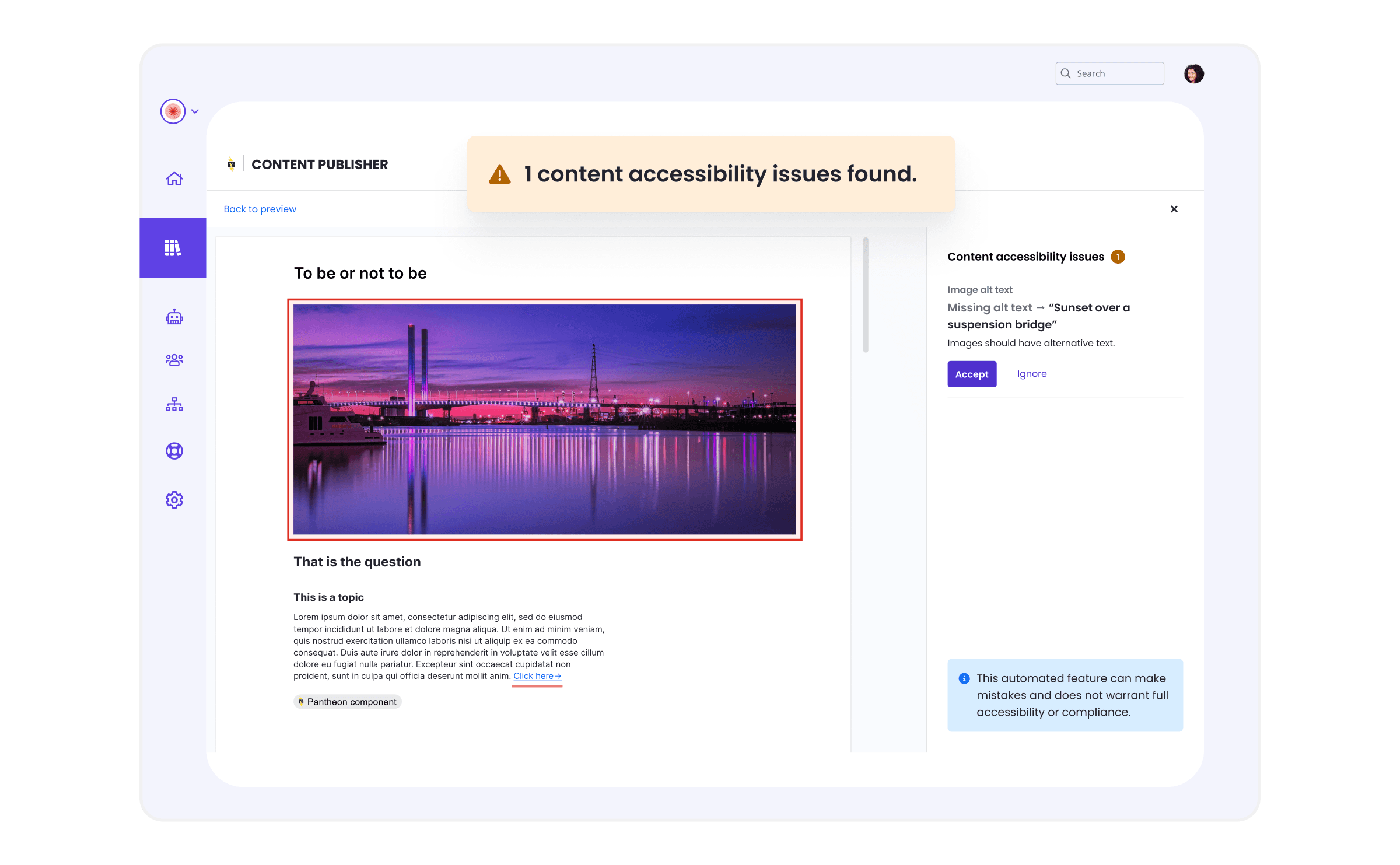
Content Publisher now includes a quality assistant — an intelligent review system that helps you create better content before you publish. Starting with accessibility checking at no added cost, the quality assistant will expand to help ensure your content meets brand standards, performs well in search, and satisfies compliance requirements.

What’s new?

The quality assistant's automatic accessibility checking helps catch common issues before you publish:

  • Missing alt text on images
  • Improper heading hierarchy
  • Non-descriptive link text
  • and more...

Issues are displayed in the sidebar with plain-language descriptions of the problem, why it affects users with disabilities, how to fix it, and where it occurs in your document.

content publisher quality assistant accessibility checker

For more information, see the quality assistant in the Content Publisher documentation.