
Pantheon release notes

Your destination for staying informed about our latest innovations and product updates.
Subscribe to RSS feed
Content Publisher
March 11, 2026

Version 1.0.5 of the Pantheon Content Publisher Drupal module is now available. This release includes bug fixes and feature improvements.

What's new?

  • Approval workflow support — Content Publisher Drupal module now supports approval workflow, allowing administrators to review and approve the content before publishing.

For more details, refer to the release notes.

March 5, 2026

Version 1.3.5 of the Pantheon Content Publisher WordPress plugin is now available.

What's new?

  • ACF integration — Sync Content Publisher metadata fields to Advanced Custom Fields. Define field mappings per post type in the plugin's Integration tab and metadata values are automatically applied on every publish.
  • Custom post type support — Publish content to any public post type registered on your WordPress site. Administrators can set the target post type per collection, or select "Chosen by the author" to let document authors control it via the wp-post-type metadata field.

Update to 1.3.5 from the WordPress dashboard under Plugins > Installed Plugins, or download it from the WordPress Plugin Repository.

For more details, see the plugin changelog.

March 5, 2026

Pantheon's Content Publisher has officially entered General Availability. All features previously available in Public Preview are now available for general use without any restrictions. This milestone also comes alongside a broad set of new capabilities announced separately but part of the generally available product:

For more information on Content Publisher, check out our documentation site for guidance on using Content Publisher.

To get started with Content Publisher, visit the product page on the Pantheon’s website. If you are curious to engage, get in touch in the #content-publisher channel of our recently relaunched [Pantheon Community Slack](https://pantheon.io/customer-community!

March 4, 2026

Pantheon Content Publisher now supports Microsoft Word thanks to our new Microsoft Add-in. This add-in allows organizations and teams to publish content directly to their website from their Microsoft 365 account in Microsoft Word.

Microsoft Word Content Publisher workflow

What's new?

  • Write, edit, collaborate, and publish from Microsoft Word (online and desktop app) to your website
  • Preview how your content will look before it goes live
  • Collaborative editing: Use comments, suggestions, and other collaboration features available on Microsoft 365

Documentation

Learn how to set up Content Publisher on your Drupal, WordPress, or Next.js website:

March 3, 2026

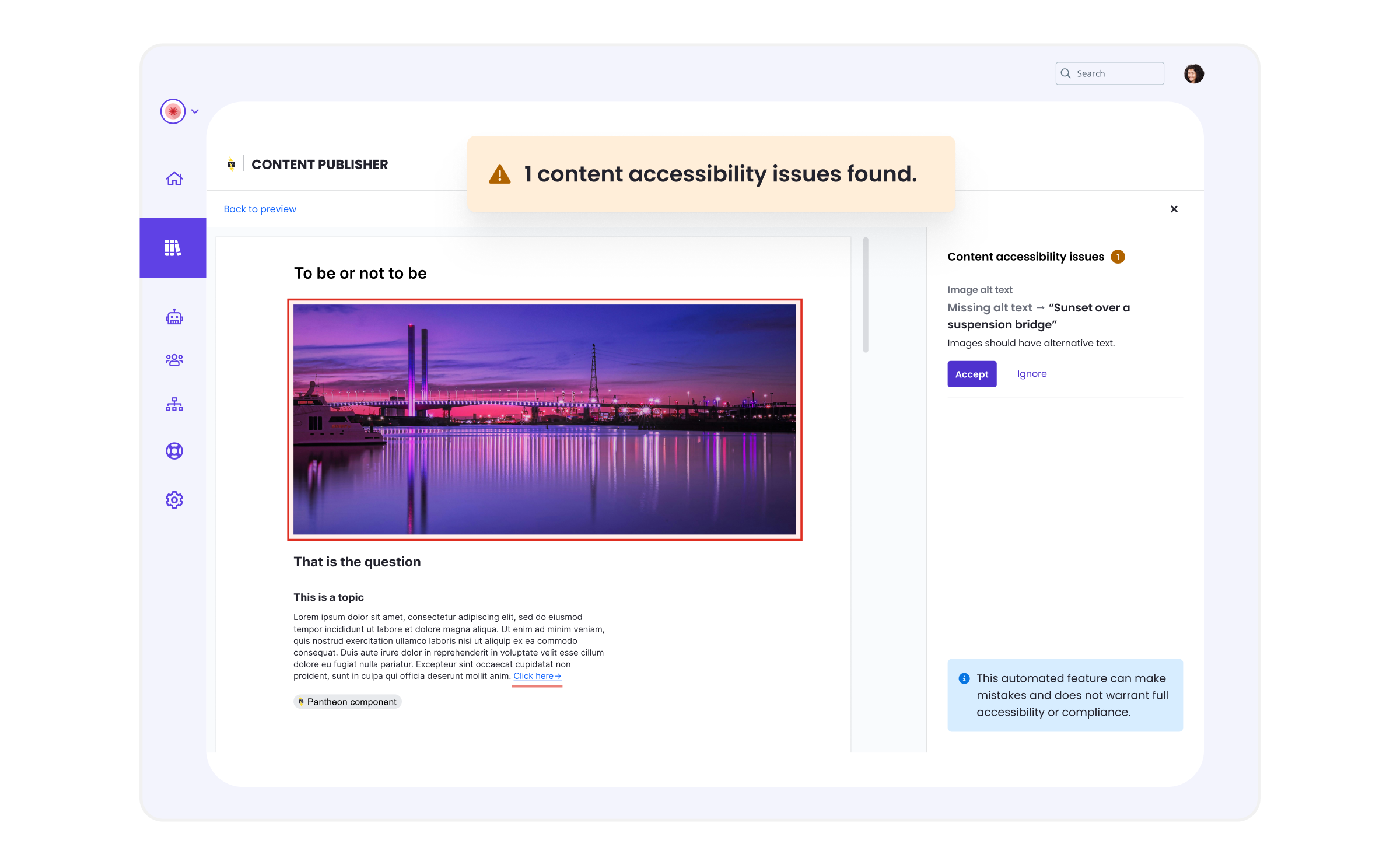
Content Publisher now includes a quality assistant — an intelligent review system that helps you create better content before you publish. Starting with accessibility checking at no added cost, the quality assistant will expand to help ensure your content meets brand standards, performs well in search, and satisfies compliance requirements.

What’s new?

The quality assistant's automatic accessibility checking helps catch common issues before you publish:

  • Missing alt text on images
  • Improper heading hierarchy
  • Non-descriptive link text
  • and more...

Issues are displayed in the sidebar with plain-language descriptions of the problem, why it affects users with disabilities, how to fix it, and where it occurs in your document.

content publisher quality assistant accessibility checker

For more information, see the quality assistant in the Content Publisher documentation.

February 10, 2026

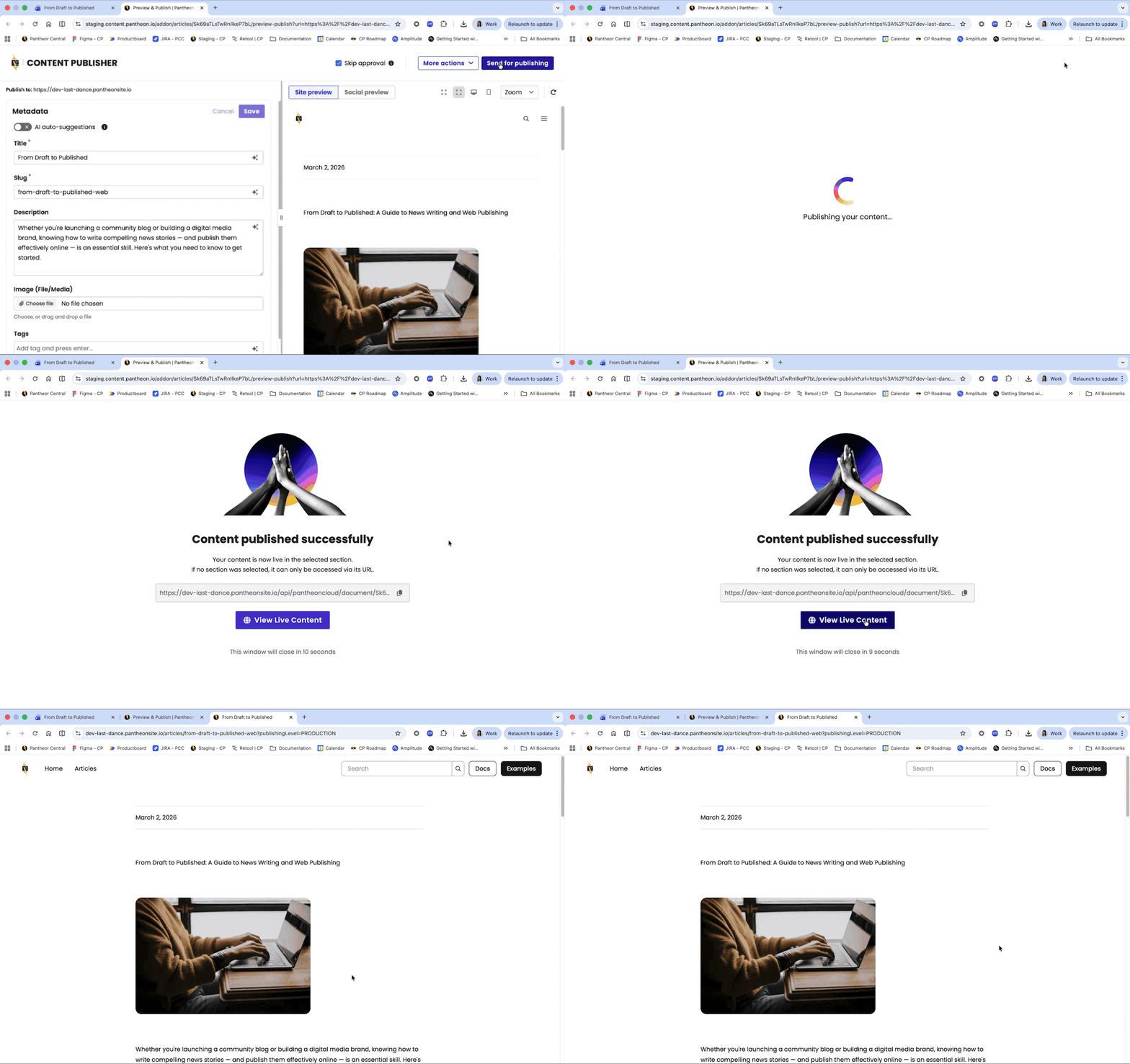
The Content Publisher MCP Server is now in Public Beta. This integration enables AI assistants and other agentic applications to interact directly with Content Publisher, streamlining content workflows through natural language commands.

The Model Context Protocol (MCP) is an open standard that allows AI assistants and agentic applications to securely connect with external tools and data sources. With the Content Publisher MCP Server, content teams can manage their publishing workflows conversationally -- without leaving their AI assistant interface.

What’s new?

  • Connect and manage documents - Connect Google Docs to collections, disconnect documents, and transfer ownership.
  • Publish content - Preview, publish, unpublish, and manage approval workflows. Manage all documents metadata.
  • Manage collections - Create collections, manage collaborators, administrators and access control, administer webhooks as well as all collection configurations options.
  • Work with content model - Manage metadata schemas.

Example workflows

  • "Create a Google Doc about our product launch and connect it to the Marketing collection, go through the preview, enrich and publish phase"
  • "Update the description metadata for the Q1 report and publish it"
  • "Add sarah@company.com as a collaborator on the Documentation collection"
  • “Find all documents with Author set at “John Doe” and replace with “Jane Doe”

And really, any other content operation workflow you might think of!

Getting Started

The Content Publisher MCP Server is now in public beta, available to all Content Publisher users. If you are not yet a user, you can sign-up for a free plan on pantheon.io. For instructions on how to install and use, see the Content Publisher MCP documentation.

We welcome your feedback as we continue to improve this integration. Please report any issues through our regular support channels or make feature requests through our Pantheon Roadmap site.
January 30, 2026

Key Changes: CLI Rename

We've renamed the Content Publisher CLI from pcc to cpub to reflect our product naming. This change affects all CLI commands and the associated NPM package.

CLI Command

  • Old: pcc
  • New: cpub

NPM Package

  • Old: @pantheon-systems/pcc-cli
  • New: @pantheon-systems/cpub-cli

Action Required

Please update your existing commands by replacing pcc with cpub. All flags and arguments remain the same. Deprecated pcc CLI still functional with warning messages.

To update your installation:

  1. First, log out of the old CLI:

  2. Uninstall the old package:

  3. Install the new package:

  4. Login to the new CLI:

Additional Changes

  • Connected Accounts are no longer tied to the user’s browser and has been migrated to server-side account management improving overall user experience
  • Dashboard now displays user account subscription and usage allowing users to keep track of their account usage limits
  • A search function has been added to the Collections dropdown in the Tokens modal for easier navigation in workspaces with many collections
  • The App Router starter kit default installation no longer uses Static Site Generation (SSG)
  • Minor bug fixes and UX improvements
December 12, 2025

Key changes

Collection metadata and publishing configurations are now managed via the Content Dashboard:

  • Go to "Collection Settings > Metadata" in the Content Dashboard to manage custom metadata fields for a given collection.
    • Previously, this was done from the Google Docs Add-on via "About this collection > Page Metadata".
    • New metadata field capabilities have also been added, such as ordering fields or specifying both their label and their machine name independently.
  • Use the entirely new "Collection Settings > Publishing" tab in the Content Dashboard to enable the following within the Google Docs Add-on for contributors across this collection:
    • Sections
    • Google Docs tabs

For details, see related documentation.

Additional changes

Bug fixes and other recent minor updates

  • Starter kits and all Next.js applications have been updated to mitigate CVE-2025-55182 and CVE-2025-66478.
  • The Ingest API previously only authorized Google accounts, but now accepts any authenticated user.
  • Refactored the sign-in and sign-up experience for a smoother onboarding process including email verification. Country, state and other dropdowns now support keyboard navigation.
  • Helper text added to collection creation for clarity. The playground guide also got improved with simplified navigation.
  • SDK status endpoint no longer exposes version information for security reasons.
  • Fixed glitch in component editor text fields that prevented input on some occasions.
  • Disconnecting documents from collection now works as expected for content contributors.
  • Fixed infinite page reload when navigating from add-ons to the collection structure.
  • Preview now allows comparing published and submitted versions when reviewing content sent for approval.
  • Permission menu entry in the Content Publisher dashboard is hidden for first-time users until a collection is created.
  • The smart component add-on interface now clearly indicates when no components are configured, avoiding users to lose time trying to use a capability not yet configured.
  • As well as several minor UX fixes and improvements