Pantheon release notes

Your destination for staying informed about our latest innovations and product updates.
Subscribe to RSS feed

October 6, 2026

Pantheon’s new dashboard home experience is now available in beta. It gives you a more useful starting point for finding your sites, accessing frequently used pages, and staying up to date with Pantheon.

Recent Sites are available in a card view:
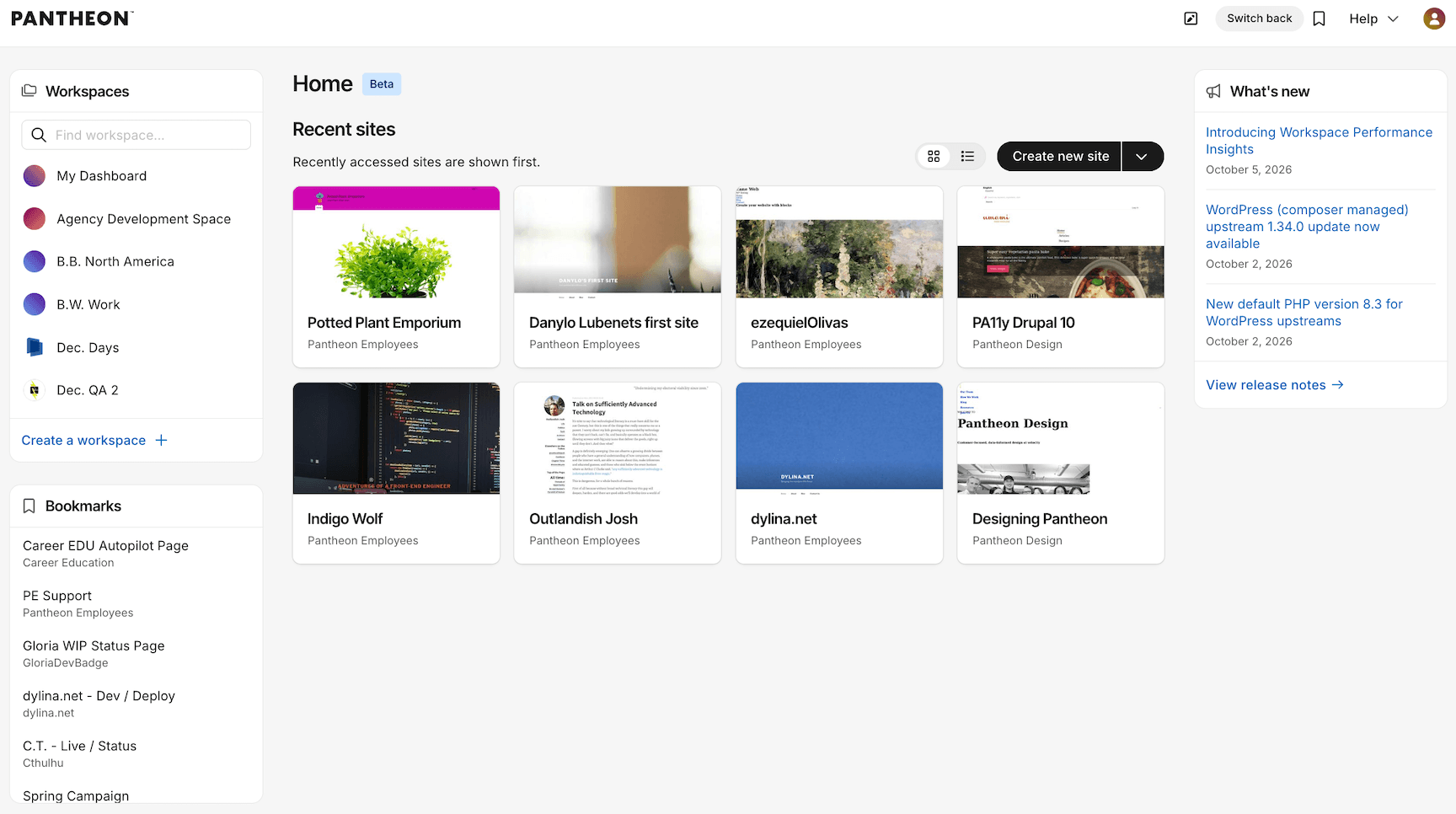
Home in card view

What’s new

  • A new Home experience - Get a single view of your Recent Sites across all of your workspaces.
  • Card or list view - Choose how you want to browse Recent Sites. List view also shows each site’s status and owning workspace.
  • Bookmarks capability - Create and access bookmarks for your frequently visited pages from Home and dashboard navigation.
  • Release notes in the dashboard - See the latest Pantheon product updates directly from the Home experience.
  • Refreshed Workspace Overview - Workspace Overview has a visual refresh and now supports the same card and list views for Recent Sites.

Switch to list view to see site status and owning workspace:
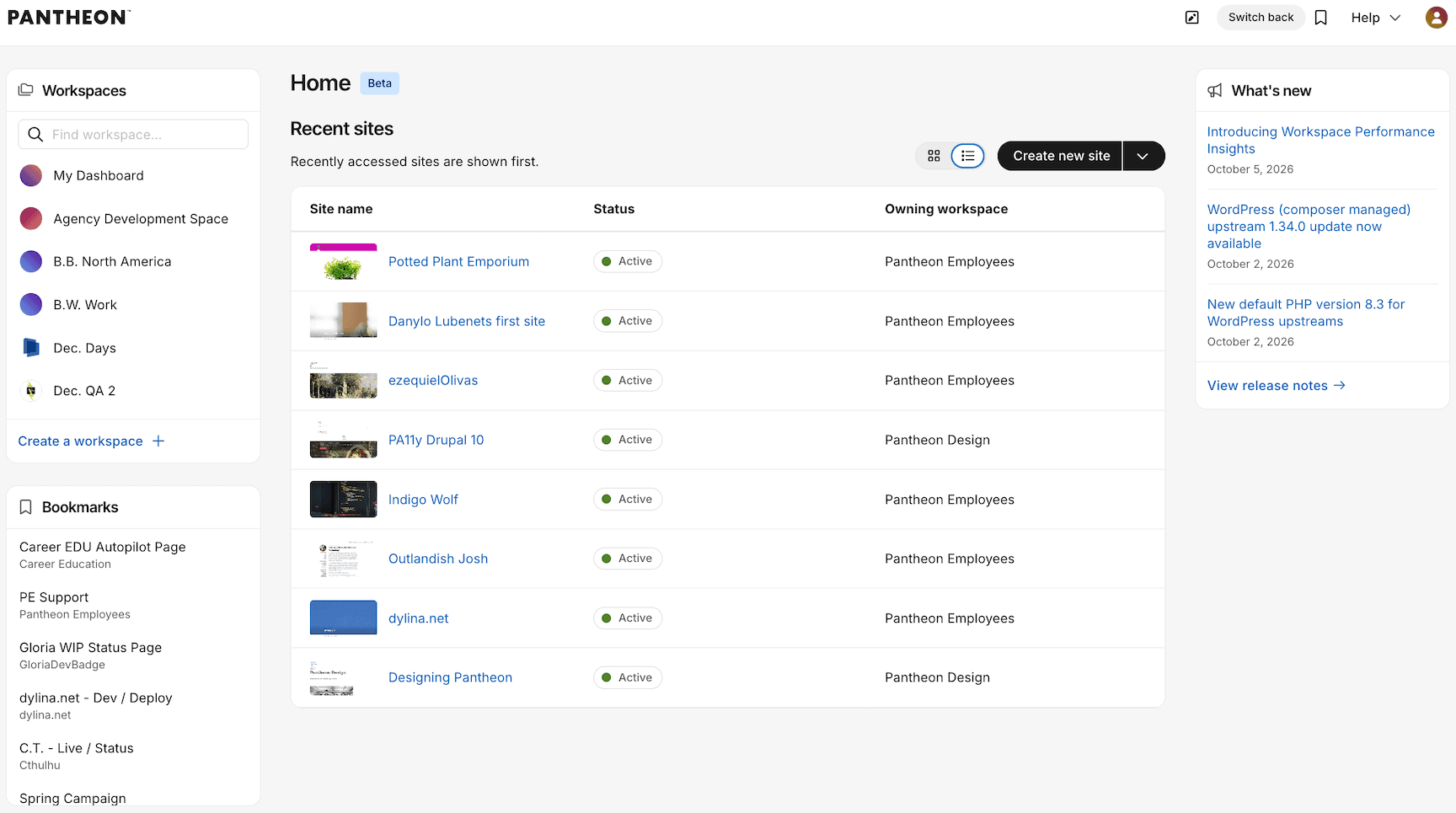
Home in list view

Open the Bookmarks panel to quickly access saved pages:
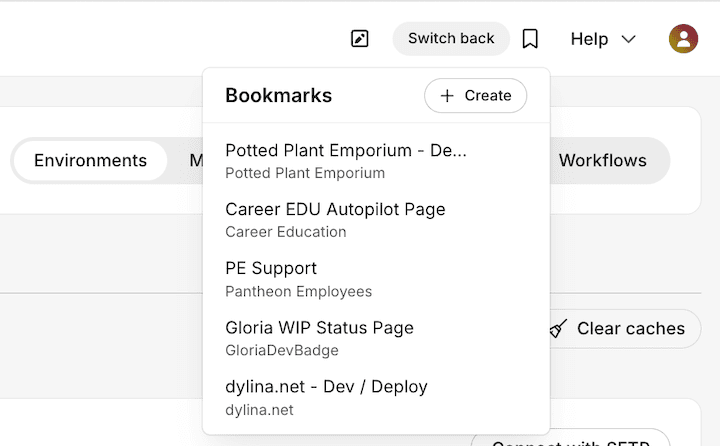
Bookmarks panel

How to try it

The new experience is available to all dashboard users, but you’ll continue to land on the current dashboard experience by default. Select Try the new dashboard to opt in to the beta. You can select Switch back at any time to return to the current experience.
October 5, 2026

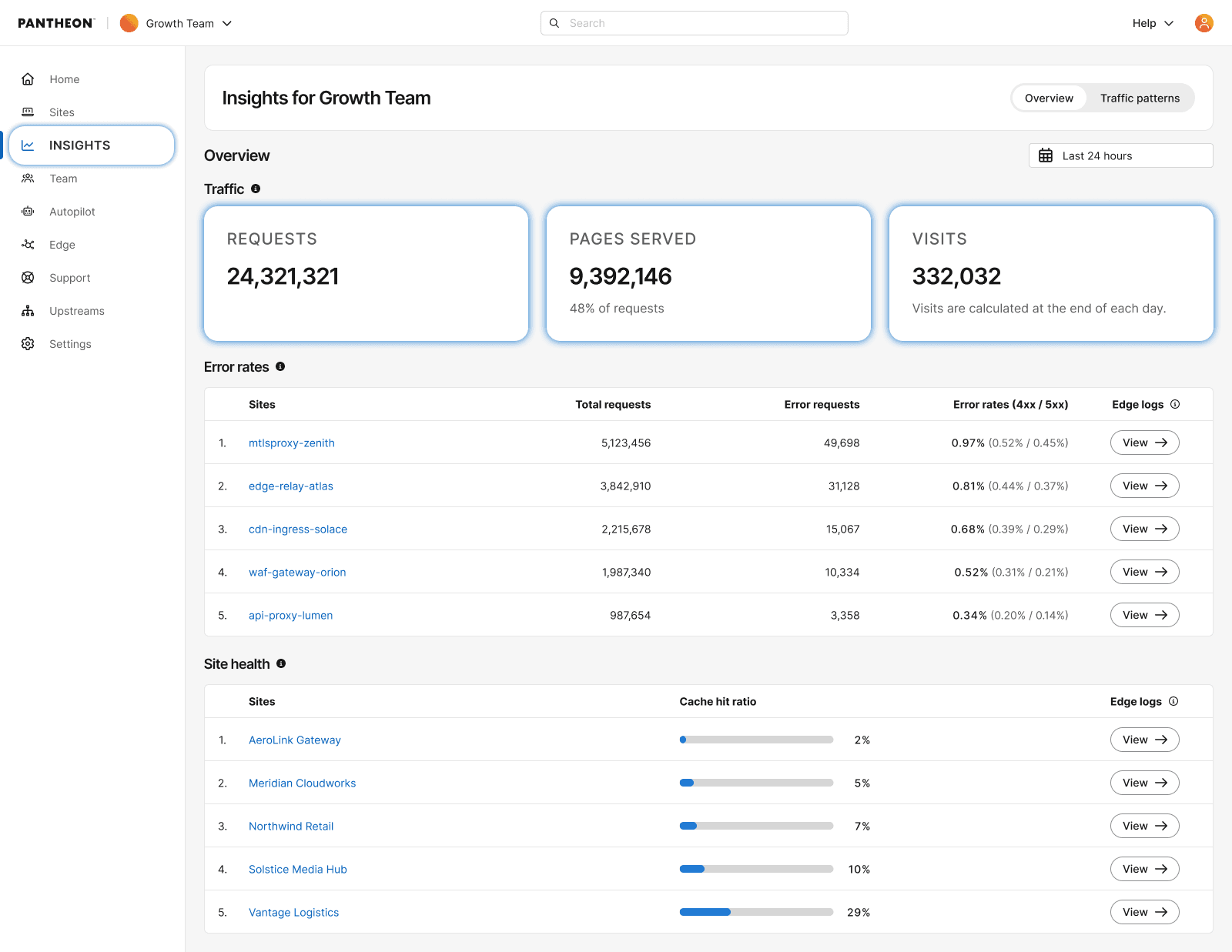
Pantheon has added workspace-level performance visibility to the Workspace dashboard – you can now see which sites in your workspace need attention without checking each site dashboard individually.

  • Error Rates: A new view on the workspace Insights page ranks your sites by error rate, so you can quickly spot which sites need updates or deeper investigation.
  • Caching Health: See which sites are seeing degraded cache performance across your entire workspace at a glance.

Click through from a flagged site directly to use deeper troubleshooting tools on its site dashboard.

workspace performance insights showing traffic, site health and error rates

Information:
Note

This feature requires your site to be on our next-generation Global CDN. If your workspace includes sites still on our legacy Global CDN, your performance overview will only reflect migrated sites.

If you have not started or completed your migration, visit our documentation to get started.

October 2, 2026

The 1.34.0 update is now available for the WordPress (composer managed) upstream. This update changes the default PHP version to 8.3, syncs the upstream with Roots Bedrock, and fixes a PHP warning. The Bedrock sync changes the Composer repository defaults, which can cause merge conflicts in your composer.json file.

Updates

  • Updates the default PHP version to 8.3 and changes the PHP requirement in composer.json to >=8.3. For more information about the PHP default change, see New default PHP version 8.3 for WordPress upstreams. (For more information see #204.)
  • Syncs the upstream with Bedrock. (For more information see #201.) This includes:
    • Changing the Composer repository from WPackagist (wpackagist.org) to WP Packages (repo.wp-packages.org). Package names for plugins and themes change from wpackagist-plugin/* and wpackagist-theme/* to wp-plugin/* and wp-theme/*.
    • Removing the roots/wp-password-bcrypt package from composer.json.
    • Setting WP_ENVIRONMENT_TYPE from WP_ENV when it is not already defined, and setting WP_DEVELOPMENT_MODE when it is configured.
    • Setting MYSQL_CLIENT_FLAGS to use SSL when DB_SSL is set.

Bug fixes

  • Resolves a rtrim() warning in PHP 8.1 and later environments. (For more information see #189. Props @mattmacneil.)

For more details, refer to the WordPress (Composer Managed) changelog.

Action required

To benefit from these updates and ensure your site is using the most current version, apply the update to your WordPress (composer managed) site or custom upstream.

If your composer.json file requires plugins or themes using wpackagist-plugin/* or wpackagist-theme/* package names, or has custom entries in repositories, applying this update can cause merge conflicts in that file. When you resolve the conflicts, keep your custom requirements and update the package names to the new wp-plugin/* and wp-theme/* names, or keep the WPackagist repository entry.

For assistance with managing merge conflicts, refer to our documentation on auto-resolving via the dashboard or manually resolving via the command line.

October 2, 2026

Pantheon has updated the default PHP version for the WordPress and WordPress (composer managed) upstreams to PHP 8.3, replacing the previous default of PHP 8.2.

New sites created from these upstreams use PHP 8.3. Existing sites that do not set php_version in their own pantheon.yml move to PHP 8.3 when they apply this upstream update.

Action required

Test the update before you deploy it to the Live environment. Apply it in Dev or a Multidev environment, confirm your plugins and theme work on PHP 8.3, then promote it.

If your site needs to stay on PHP 8.2, pin the version by setting php_version: 8.2 in your site's pantheon.yml before you apply the update. For steps, see Manage PHP Versions.

If you maintain a custom upstream, this change is not reflected in your pantheon.upstream.yml unless you update your fork from Pantheon's upstream.

October 1, 2026

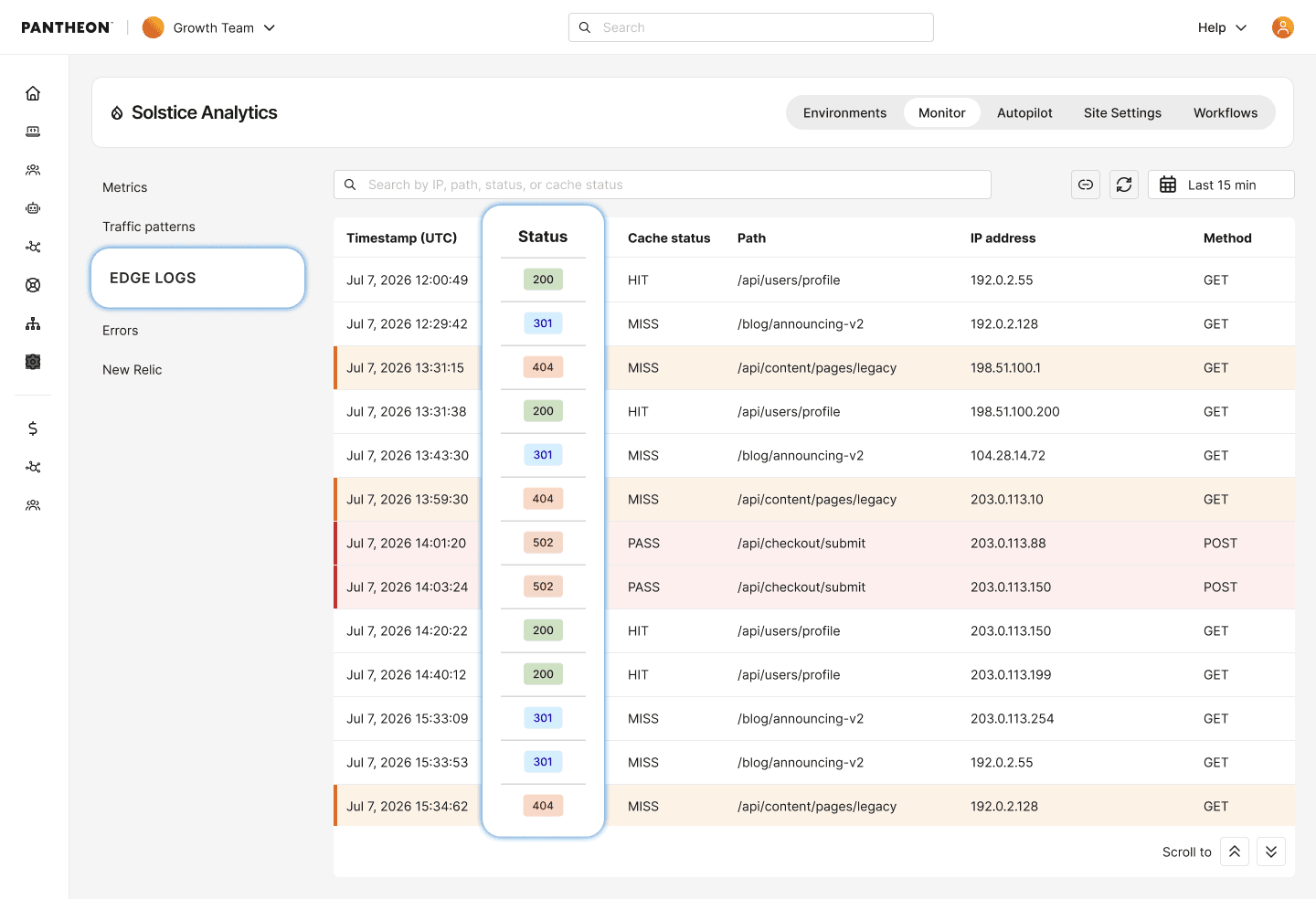
Pantheon now shows edge-level request activity in the dashboard, including cache statuses, ASNs, and response codes.

  • A new log explorer in the site dashboard shows how requests were handled at the edge, allowing request-specific investigation for up to 24 hours.
  • Search by HTTP status code, path, client IP, user agent, ASN, and time range.
  • Copy a permalink to a specific log view, including your search and time range, to share with a teammate for review.

For details, see related documentation.

edge access logs showing access logs

Information:
Note

This feature requires your site to be on our next-generation Global CDN. If your workspace includes sites still on our legacy Global CDN, your performance overview will only reflect migrated sites.

If you have not started or completed your migration, visit our documentation to get started.

September 30, 2026

PHP 8.1 has reached End of Sale on the Pantheon platform. Newly created sites after September 30 2026 will no longer be able set their PHP version to 8.1.

Sites already running PHP 8.1 continue to run. They keep receiving LTS security coverage through PHP Runtime Generation 2, with no action required. A removal date for PHP 8.1 has not been set, and Pantheon guarantees at least 90 days of advance notice before removing any PHP version from the platform.

Action required

If you maintain a custom upstream that sets php_version: 8.1 in pantheon.upstream.yml, update it to a supported version. New sites created from that upstream may otherwise behave unexpectedly on creation.

If your site runs PHP 8.1, plan an upgrade to a recommended PHP version. Pantheon recommends PHP 8.3 or 8.4 for all production sites. For steps, see Upgrade PHP Versions.

September 30, 2026

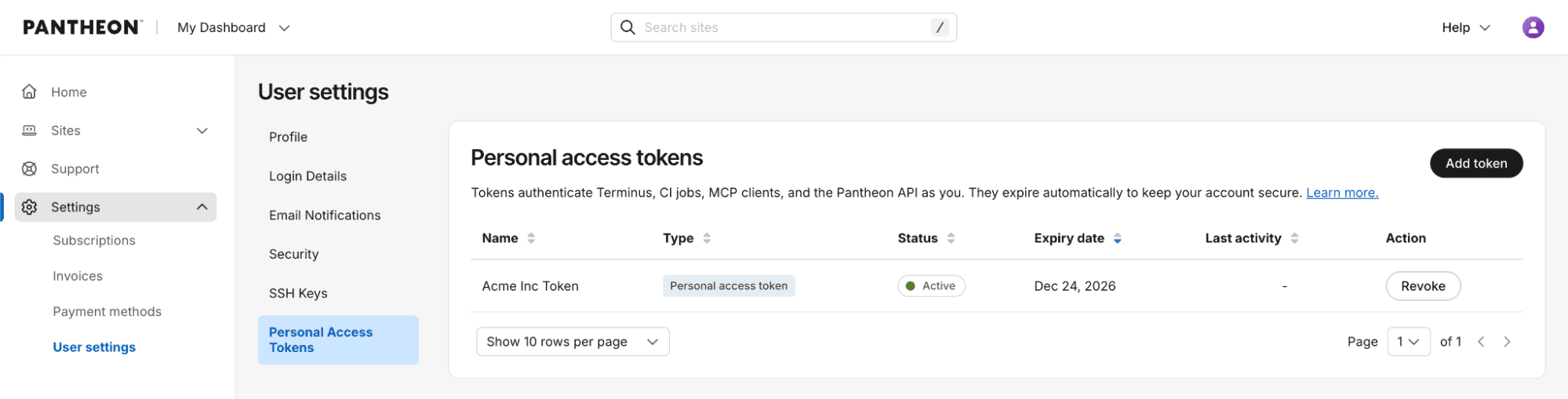
Pantheon is renaming machine tokens to personal access tokens (PATs) and adding stronger security controls with automatic expiration.

What’s changed

  • Time-bound credentials: New PATs expire 90 days after creation, reducing the risk of credentials that remain valid indefinitely.

What hasn’t changed

  • Continue using the same Terminus flow and commands for authentication, listing, and deleting tokens.
  • Continue to create and revoke tokens in the dashboard under your User settings.

What this means for legacy machine tokens

Existing machine tokens continue to work and are not changed by this release. No immediate action is required. Machine tokens are now considered a legacy authentication method, so we recommend using personal access tokens for new integrations and workflows.

If you adopt a PAT, plan to renew it every 90 days and update the corresponding secret wherever the token is used.

Get started

Create a new personal access token from User settings → Personal Access Tokens, copy it once, store it securely, and use it with your existing Terminus authentication workflow.

Dashboard interface showing new personal access tokens

For more details, see related documentation.

September 30, 2026

Pantheon is beginning the phased migration of Advanced Global CDN (AGCDN) to our next-generation edge platform. Starting September 30, 2026, AGCDN customers whose current configuration is fully supported in Phase 1 are eligible to migrate. Pantheon will contact eligible customers directly.

What's included

Once your migration is complete, you control your edge settings yourself in the Pantheon Dashboard. Changes no longer require a request to Pantheon. Phase 1 controls are configured at the workspace level, apply to every site and environment in the workspace, and are enforced at the edge before requests reach your site.

  • IP and CIDR blocking
  • Geo blocking
  • ASN blocking
  • Enterprise WAF
  • Image Optimization

How migration works

This migration is not self-serve. Pantheon's Professional Service will:

  1. Review your current Legacy AGCDN configuration and confirm feature support with current capabilities on NextGen.
  2. Migrate your supported rules and configuration.
  3. Make the migrated configuration available for you to review.
  4. Coordinate the DNS cutover with you during an agreed change window.
  5. Validate the configuration after cutover.

Action required

If you are eligible for Phase 1, you will receive an email. Respond to the ticket to confirm your technical contact so we can schedule your migration.

AGCDN customers who are not contacted for Phase 1 don't need to do anything at this time, and will be contacted at a later date.

Learn more about our switch to Next-generation GCDN with bot protection in this related blog post.