
Pantheon release notes

Your destination for staying informed about our latest innovations and product updates.
Subscribe to RSS feed

Account management
August 31, 2026

You can now delegate site team management with a new site-level role: Site Administrator. It lets you give a trusted person full control over a single site's team - inviting members, changing their roles, and managing Supporting Workspaces - without also granting workspace-level access, or the ability to change billing or site plans.

Previously, there was no role between Workspace Administrator and Site Team Member that could manage a site's team. Organizations had to either grant broad workspace-level admin access just to manage one site, or route every team change through a Workspace Administrator. Site Administrator closes that gap, making it easy for organizations to hand off a site to a lead (or leads) to manage site-level teams.

What's new

  • A new role - Site Administrator appears on the Team tab of the Site Dashboard, visible only to Workspace Administrators and Site Owners — the only roles that can assign it.
  • Delegated team management - Site Administrators can invite and remove Team Members and Developers, change their roles, and add and remove Supporting Workspaces for the site.
  • Everything a Team Member can do - Site Administrators inherit all Team Member permissions, including deploying to Test and Live, managing custom domains, and uploading files.
  • Boundary on billing and deletion - Site Administrators cannot access billing, change the site's plan, transfer ownership, or delete the site.

What you need to do

The Site Administrator role is additive. No existing permissions change. Assign the role when you're ready to delegate site team management.

For the full permissions matrix and step-by-step assignment instructions, see related documentation

April 2, 2026

Multi-Factor Authentication (MFA) for dashboard authentication is now available to all Pantheon users. You can now opt in to MFA from your personal account settings to add an extra layer of security to your Pantheon login - no matter how you sign in.

What's new?

MFA is now available as an opt-in security feature for all Pantheon users. Once enabled, you'll be required to verify your identity with an authenticator app each time you log in to the Pantheon dashboard.

Key details:

  • Available to all users - MFA is not limited to any login method. Whether you sign in with email and password, Google, or another method, you can opt in.
  • Set at the user level - MFA is a personal account setting, not a workspace setting. Each user manages their own MFA enrollment independently.
  • Authenticator app supported - We currently support TOTP-based authenticator apps.
  • Opt-in - MFA is voluntary. You can enable or disable it at any time from your personal settings.

For more details, see related documentation.

October 16, 2025

Effective October 22, 2025, the "Unprivileged" user role will be transitioned to a new "Contributor" role. Permissions will remain exactly the same, except that Contributors will have limited access to Workspaces in the Pantheon Dashboard. This update is to ensure that all Pantheon users have access to the modern dashboard experience.

No action is needed by Site Owners or Workspace Administrators.

Key changes

  • The name will change from Unprivileged to Contributor
  • Contributors will have limited access to Workspaces:
Workspace ContextContributor Permission
Home⚠️ Limited access: Total number of sites and team members are not shown.
Sites > Site list⚠️ Limited access: Only sites they create and sites they have been added to will be shown.
Sites > Create new site
Sites > Migrate existing site
Team
Autopilot
Edge
Support⚠️ Limited access: They can start a Live chat, but they cannot open tickets or see Workspace ticket history
Upstreams
Settings > Billing
Settings > Profile

Users assigned this role will retain access solely to the sites for which they have been explicitly granted permission. They will not be authorized to modify Workspace configurations, access billing information, create custom upstreams, or perform other administrative functions. If these users are in multiple Workspaces, they will continue to have access to the Workspace Selector to change which Workspace they are currently working in.

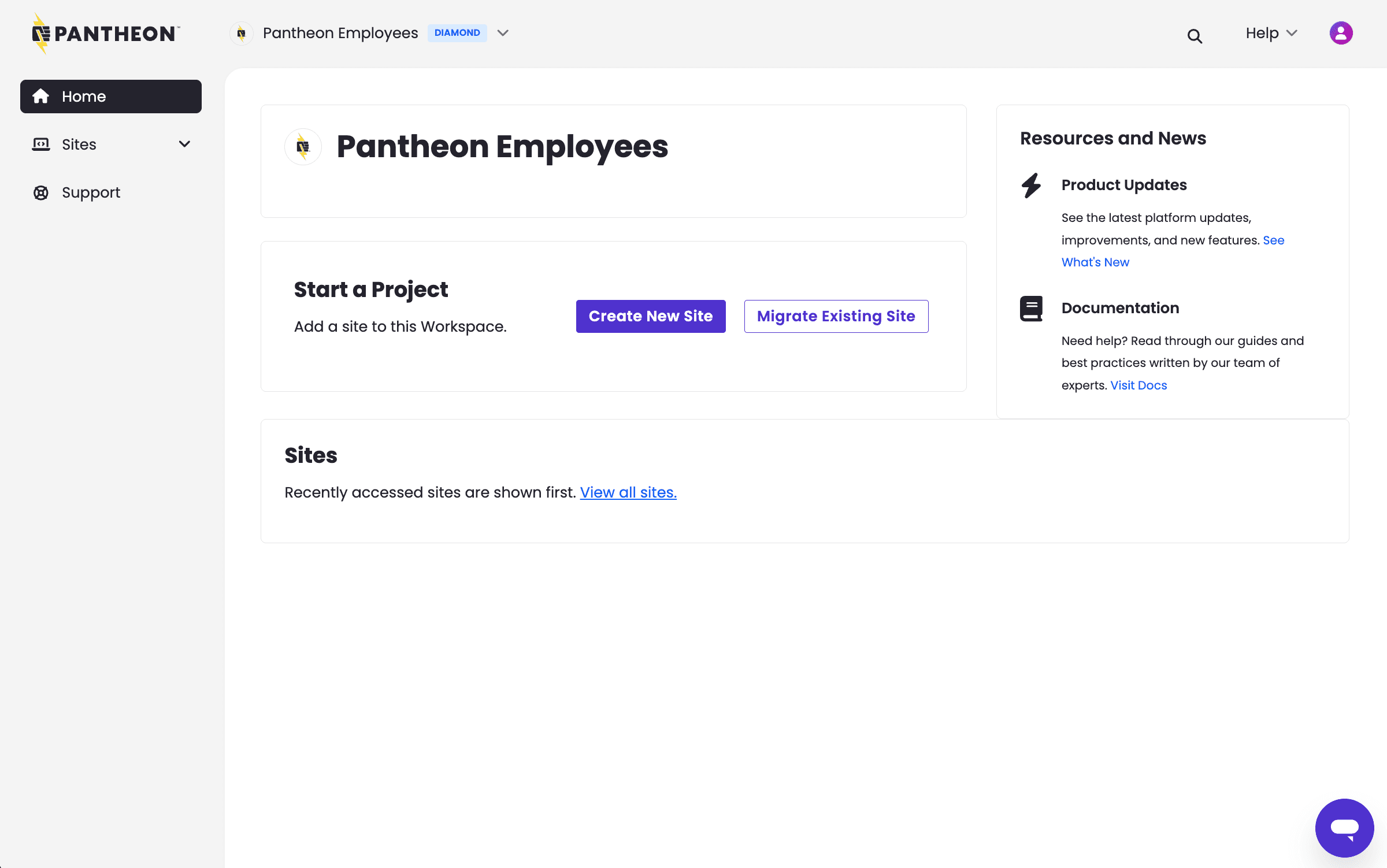
Here's what you can expect a Contributor to see when accessing the Workspace:

Contributor view of a workspace in the Pantheon Dashboard

January 15, 2025

What's new?

An improved support experience for Advanced Global CDN (AGCDN) customers is now available in the Edge tab of your professional workspace.

From this tab you can now submit a change request form for modifying AGCDN configurations. After the form is submitted, a new AGCDN support ticket is created with improved routing internally - resulting in fewer delays and faster updates.

To learn more about this experience, see related documentation.

Why is this being done?

Previously, the Advanced Global CDN service lacked a dedicated category within the Support dashboard. This could result in delays and inefficiencies when processing requests, as critical details were often missing or had to be clarified through additional communication. The new Change Request Form is designed to collect all necessary details upfront.

What's next?

The roll-out of this form is a first step toward providing Pantheon's AGCDN customers with a dedicated area in the workspace to make AGCDN changes. In the future, we'd like for customers to be able to make AGCDN configuration changes on their own, if they choose to do so.

November 1, 2023

Administrators of large workspaces will now be able to easily remove access for offboarded users at scale. When a member of your team changes jobs, or for whatever reason you need to remove a person from your sites, you can now do so faster

As you remove users from your workspace or site team, you will be prompted to remove access across all sites that a given user may be connected to, which can save multiple clicks and manual labor to ensure the right access levels are maintained.

To learn more about how this new offboarding process works, take a look at our documentation.

September 1, 2023

Helps Workspace Admins more effectively manage user access by providing the ability to offboard users from multiple sites in a single click.

For more information, see Pantheon’s documentation on Workspace Offboarding. Or join the #WordPress Slack Channel to connect with other Pantheon customers & super-users.

February 1, 2023

Enhancements to the Workspace dashboard allow admins greater visibility and control over user roles, access levels, and privileges. Now, admins can perform periodic audits of users and permissions by Site or Workspace, communicate development work to specific users by Site group, and quickly onboard and offboard users at the Workspace and Site level. To learn more about roles and permissions, refer to our documentation.

October 1, 2022

Previously, users with the Unprivileged role were not able to create sites using Custom Upstreams. Users with the Unprivileged role do not possess permissions to access the Workspace Dashboard and could not create sites using Custom Upstreams. Now, it's possible to create a site using a Custom Upstream from the Personal Workspace in the New Dashboard. Click Create New Site and then select Upstream From Workspace.