Pantheon release notes

Your destination for staying informed about our latest innovations and product updates.
Subscribe to RSS feed
August 26, 2026

Pantheon's GitLab support for external repositories is now generally available to everyone directly from the Pantheon Dashboard, alongside GitHub and Pantheon-hosted Git.

What's new

  • Dashboard support — When creating a new site, choose GitLab as your code host right alongside GitHub and Pantheon's integrated Git repository — no Terminus required.
  • Self-hosted GitLab — Connect to GitLab.com or your own self-hosted GitLab instance.
  • Token-based authentication — Authenticate using a personal access token or group access token with api and write_repository scopes.

Where to find it

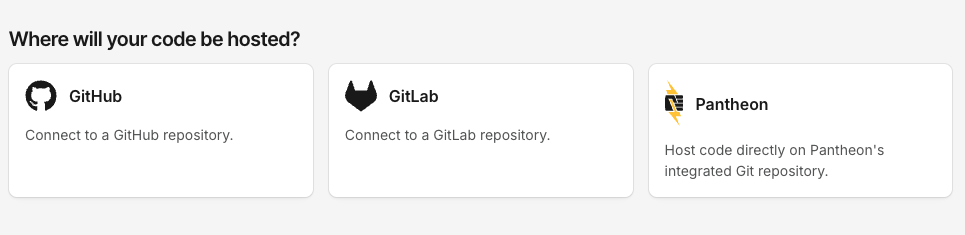
During site creation, select GitLab on the Where will your code be hosted? screen to connect your repository.

Where will your code be hosted screen showing GitHub, GitLab, and Pantheon options

For full setup instructions, see the related documentation.

August 24, 2026

Getting help on Pantheon is now faster and simpler. The Support tab in your dashboard will soon have a single access point for all support requests: start a conversation, describe your issue, and get routed based on your needs.

What's new

One place to get help. The previous ticket options in the dashboard have been replaced by a single, AI-powered conversational entry point on the Support tab. No more sifting through endless menus or categories to choose up front—just describe what you need.

Faster answers. Many common questions are now resolved immediately, any time of day, without waiting for a queued ticket response.

Routing based on your needs. When your request needs hands-on help, it's handed off to the right support team with the context you've already shared—prioritized and categorized automatically—so you don't repeat yourself, and your issue reaches the right people sooner.

Get the best experience: start from your workspace

Support access is tied to your workspace plan. For the fastest, most complete experience, open Support from the workspace you're working in rather than from an individual site. Starting from your workspace ensures you receive the full support benefits of your plan.

What you need to do

Nothing—there's no action required, and any current open tickets are unaffected. Next time you need help, head to the Support tab in your workspace and simply start a conversation with our AI-powered assistant.

Note: You can reach our support team at any time—just ask, and we’ll get you to the right person. Phone support remains available for eligible plans.

Built with your privacy in mind

Support conversations are processed solely to help resolve your request. Your data is not used to train AI models, and our AI providers do not retain or use your data for their own purposes. Support interactions remain subject to Pantheon's existing Privacy Policy and data protection commitments.
August 20, 2026

Terminus 4.3.3 is now available. This release adds a rollbackable column to node:builds:list, a new site_admin role, and automatic session token refresh for long-running commands, along with several bug fixes.

Key improvements in this release

  • rollbackable column for node:builds:list: Surfaces which builds are still eligible for rollback, so you can see rollback eligibility without a separate call. (#2903)
  • New site_admin role: Adds support for the site_admin role. (#2878, #2895)
  • Automatic session token refresh: Terminus now automatically refreshes session tokens that expire during long-running command execution, preventing commands from failing partway through. (#2900)
  • Fixed env:code-log crash on eVCS sites: Guarded against null commit labels that previously caused a crash. (#2911)
  • Fixed plugin installs blocked by composer audit: composer audit.block-insecure is now written directly to composer.json, so plugin installs no longer fail when a pinned dependency has an open security advisory. (#2891)

How to upgrade to Terminus 4.3.3

If you use Homebrew (macOS-only) to manage your Terminus installation, you should upgrade using:

If you installed Terminus directly from the .phar file, you should upgrade using the self:update command:

For more information about this release, visit the GitHub release page.

If you have questions or concerns around Terminus, please use the Terminus issue queue.

August 20, 2026

Integrated Composer runs composer audit on every build to check your dependencies against known security advisories.

  • Dev and Multidev: Builds always succeed, even if advisories are found.
  • Test: Deploying to Test fails if the latest Dev build has open advisories you haven't explicitly acknowledged.
  • Live: Not audited directly, but blocked transitively, since Live only receives code by deploying from Test.

Action required

If a deploy to Test fails because of a security advisory, update the affected package where possible. When you can't update right away, you can tell Composer to stop flagging specific advisories using the config.policy block in composer.json, while keeping a version-controlled record of what you've accepted and why.

See Handling security advisories for how the check works and how to manage your own list of exclusions.

August 19, 2026

The latest version of WordPress, 7.1, is available on Pantheon as of August 19, 2026.

Action required

Upgrade to WordPress 7.1 right from your Pantheon dashboard or Terminus to access the latest features, fixes, and security enhancements. See related documentation for how to apply core updates.

Highlights

  • Collaboration with Notes — Inline notes with @mentions and rich text formatting, plus suggestion mode and emoji reactions for asynchronous feedback.
  • Expanded styling controls — Style blocks across screen sizes and style interactive states without writing custom CSS.
  • Media improvements — A free-form image cropper, support for more image formats, and more resilient client-side media handling.
  • New blocks — A Playlist block for collections of audio files with optional waveform visualization, and a Tabs block for organizing content into clickable panels.
  • Site identity in the Site Editor — Title, tagline, and site icon now live in their own labeled section.
  • Accessibility — A new accessible tooltips API, more predictable screen reader behavior, and improved labeling throughout the admin.
  • ...and more

For full details about WordPress 7.1, see the release notes or the WordPress 7.1 Field Guide.

August 19, 2026

As part of Pantheon's Long-Term Support (LTS) for Drupal 7, Drupal 7.106 is now available with a backported security patch.

This release backports the fix for SA-CORE-2026-010, an information disclosure vulnerability in the Image module. Image style derivatives stored on file schemes other than the core private scheme could be served without the access checks intended for access-restricted images.

Action required

Apply the latest upstream update to your Drupal 7 site to receive this fix. See related documentation for how to apply core updates.

About Drupal 7 Long-Term Support

Pantheon has partnered with Tag1 Consulting to deliver security updates and maintenance for Drupal 7 sites. This extended support is included at no additional cost.

For configuration guidance and detailed information, visit our related documentation.

August 18, 2026

Pantheon MU-Plugin 1.5.7 adds dismiss and hide controls for the Pantheon WordPress core update notice ("A new WordPress update is available!"). Apply upstream updates to get this version of the mu-plugin.

Dismiss the notice

Any user who sees the notice can dismiss it with the X in the corner. The dismissal is saved per user, so it persists across page loads and logins. The notice reappears only when a newer WordPress version becomes available.

Hide the notice

To hide the notice more permanently, or for everyone, you can:

  • Target #pantheon-update-notice (or the .pantheon-update-notice class) with CSS.
  • Return false from the pantheon_show_update_notice filter.
  • Define the PANTHEON_SHOW_UPDATE_NOTICE constant as false in wp-config.php.

For details, see Suppress WordPress Admin Notice.

August 17, 2026

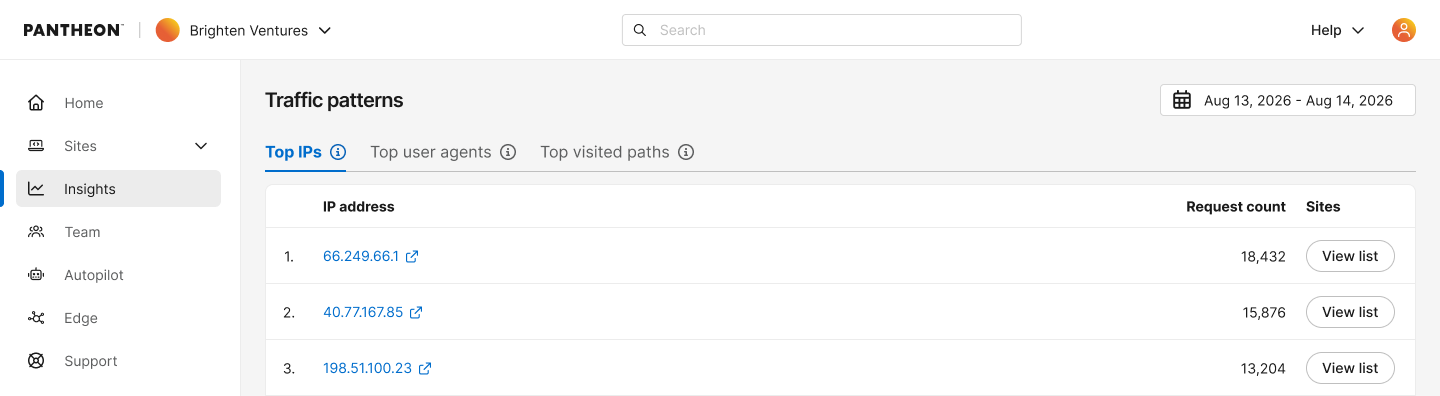
Pantheon has extended traffic visibility on the dashboard – you can now see aggregated traffic insights across your entire workspace, giving portfolio managers and agencies a single view of what's happening across all their sites.

  • Workspace Top IPs, User Agents, and Visited Paths: New tabs on the workspace Insights page show the top IP addresses, user agents, and visited paths generating traffic across every site in your workspace – no need to check each site individually to spot patterns.
  • Drill-Down by Site: Click into any row to see which specific sites are driving that traffic, so you can quickly pinpoint where to focus your attention.
  • User Agent Parsing: Instantly see a parsed breakdown of any user agent to help you confirm whether high-volume traffic is a real visitor or something worth investigating further.
  • IP Investigation: Click any IP address to open its AbuseIPDB report so you can quickly assess whether it has a history of malicious activity.

For more details, see related documentation.

Information:
Note

This feature is only available for sites that have migrated to our next-generation Global CDN. If your workspace includes sites still on our legacy Global CDN, your insights data will only reflect the migrated sites.

If you have not started or completed your migration, visit our documentation to get started.

top IPs