Pantheon release notes

Your destination for staying informed about our latest innovations and product updates.
Subscribe to RSS feed
April 2, 2026

Following a successful Alpha phase, the next-generation Global CDN (GCDN) is now entering Beta. The new GCDN introduces bot protection by default — meaning sites that migrate will automatically benefit from bot detection and mitigation without any additional configuration or cost.

What's included

  • Automated bot detection and scoring — Incoming traffic is automatically evaluated and scored, with managed challenges issued to suspicious requests.
  • Verified bot identification — Legitimate bots (such as search engine crawlers) are recognized and allowed through while unverified bots are challenged.

Action Required

Eligible sites will see a banner at the site level in the Pantheon dashboard. To participate in the Beta:

  1. Look for the GCDN Beta banner on your eligible site.
  2. Click the banner and follow the guided steps.
  3. Update your DNS records to point to the new GCDN infrastructure.

During the Beta, DNS-01 TXT record validation is the only supported method for domain verification. You will need to add TXT records to your DNS provider to verify domain ownership.

Known limitations

  • Traffic metrics — The traffic metrics page in the Pantheon dashboard will not reflect GCDN Beta traffic during the initial Beta period. Traffic metrics for migrated sites will be restored in a future update.

Eligibility

The following configurations are not eligible for the GCDN Beta at this time:

  • Sites using Advanced Global CDN (AGCDN), WAF, or Security Starter packages
  • Sites with Multi Zone Failover enabled
  • Sites using Custom Certificates

More information

To learn more about the new GCDN Beta with Bot Protection, see our beta documentation page on our docs site.

April 1, 2026

Terminus 4.1.8 is now available. This patch release adds a warning when creating sites without specifying an organization, ahead of the Q2 2026 requirement that all sites belong to an organization.

Key improvements in this release

  • site:create --org warning: Warns users when site:create is called without the --org option, and provides a clear error message if the backend rejects the request. The --org option help text now indicates the upcoming requirement. (#2786)

How to upgrade to Terminus 4.1.8

If you use Homebrew (macOS-only) to manage your Terminus installation, you should upgrade using:

If you installed Terminus directly from the .phar file, you should upgrade using the self:update command:

For more information about this release, visit the GitHub release page.

If you have questions or concerns around Terminus, please use the Terminus issue queue.

March 31, 2026

We have renamed Personal Workspaces to My Dashboard and have removed the ability to create new sites directly within it. Going forward, all new sites must be created within a Professional Workspace.

For details on workspaces, including how to create a free Professional Workspace, see related documentation.

What's changing?

  • The Personal Workspace has been renamed to My Dashboard throughout the Pantheon dashboard.
  • Site creation:
    • In the dashboard, the option to select a Personal Workspace during site creation has been removed. Users must now select a Professional Workspace when creating a new site.

    • From the commandline, running terminus site:create without the --org flag returns this warning:

      An org must be defined to create a site.

      Sites created via Terminus without an org are added to your My Dashboard workspace.

What's not changing?

Existing sites associated with My Dashboard are not affected. This update to the dashboard site creation process only prevents new sites from being added.

Site creation via Terminus without an org will still complete successfully at this stage. No changes to your existing Terminus scripts are required yet.

Looking ahead

Starting June 1, 2026, specifying an org will be required when creating sites via Terminus. We recommend updating your scripts now to avoid disruption:

March 26, 2026

Terminus 4.1.7 is now available. This hotfix release fixes the domain:verify command to properly display DNS challenge details.

Key improvements in this release

  • domain:verify fix: Fixed the command to display DNS challenge details when a domain is unverified, and added polling for verification status after triggering verification (#2797)

How to upgrade to Terminus 4.1.7

If you use Homebrew (macOS-only) to manage your Terminus installation, you should upgrade using:

If you installed Terminus directly from the .phar file, you should upgrade using the self:update command:

For more information about this release, visit the GitHub release page.

If you have questions or concerns around Terminus, please use the Terminus issue queue.

March 20, 2026

Terminus 4.2.0-rc.1 is now available as a pre-release. This release candidate merges several standalone plugins into Terminus core and adds Elasticsearch support with unified search commands.

Key improvements in this release

Information:
Note

The Secrets Manager, Repository and Node Logs plugins will be deprecated after the final release of Terminus 4.2.0 as these features will have been merged into Terminus core. Older versions of Terminus will still require these plugins if the functionality they add is required.

How to install Terminus 4.2.0-rc.1

This is a pre-release version intended for testing. To install it directly from the .phar file, you can download it from the GitHub release page.

For more information about this release, visit the GitHub release page.

If you have questions or concerns around Terminus, please use the Terminus issue queue.

March 19, 2026

Terminus 4.1.6 is now available. This release adds the domain:verify command, new Elasticsearch search commands, and deprecates the legacy Solr commands.

Key improvements in this release

  • Domain verification command: New domain:verify command allows users to verify domain ownership directly from Terminus (#2790)
  • New search commands: New search:enable and search:disable commands for managing search indexing services (#2783, #2784)
    • Note: These commands are currently non-functional for WordPress until Elasticsearch platform compatibility is added
  • Solr command deprecation: solr:enable and solr:disable are now deprecated in favor of the new search:enable and search:disable commands
  • Bug fix: Fixed empty body handling to use object instead of array (#2780)

How to upgrade to Terminus 4.1.6

If you use Homebrew (macOS-only) to manage your Terminus installation, you should upgrade using:

If you installed Terminus directly from the .phar file, you should upgrade using the self:update command:

For more information about this release, visit the GitHub release page.

If you have questions or concerns around Terminus, please use the Terminus issue queue.

March 13, 2026

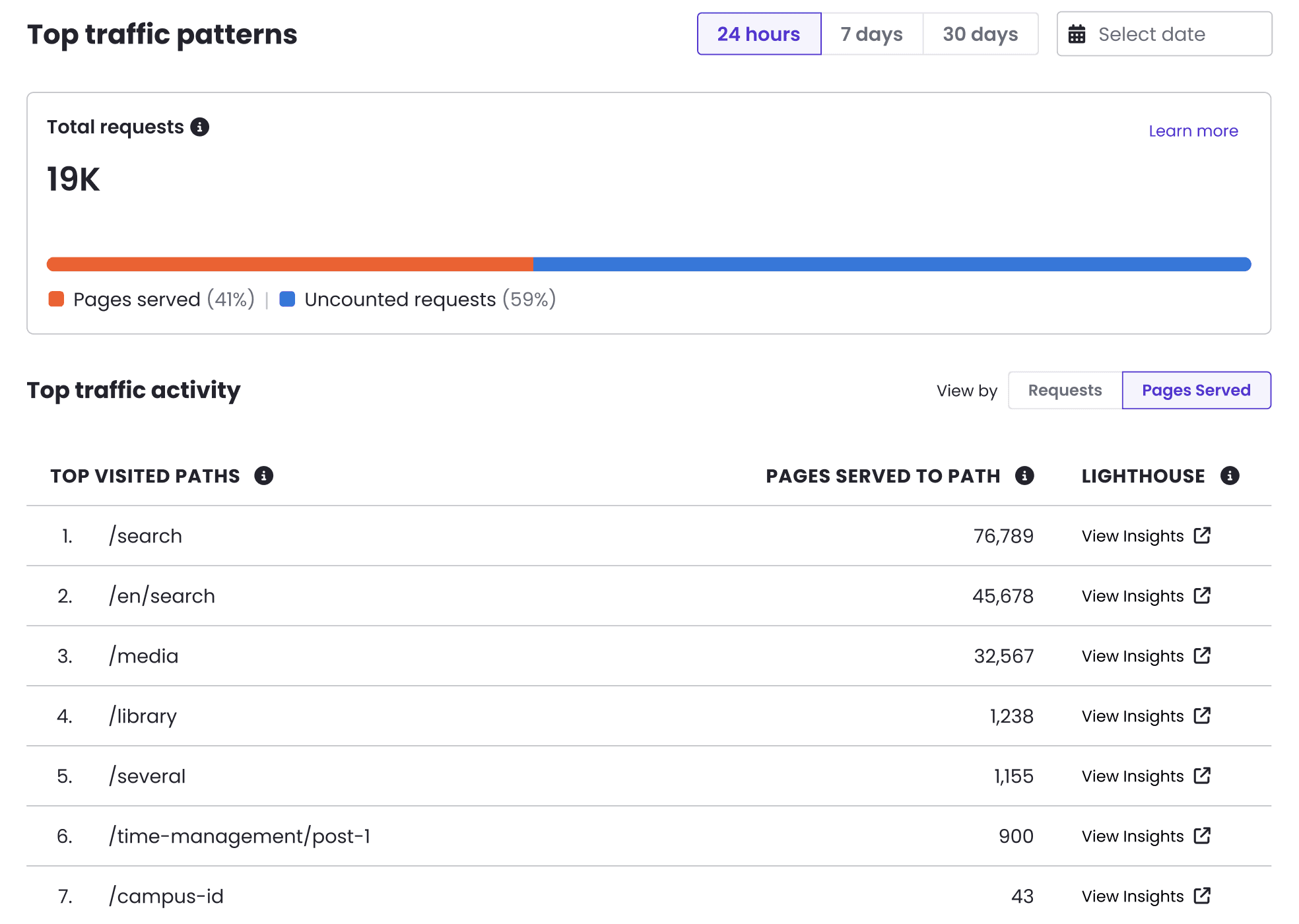
We are continuing to enhance the Top Traffic Patterns interface to help you go from insight to action even faster.

  • Click-to-Audit for top paths: You can now run Google Lighthouse performance audits directly from the Top Paths table. Easily check the performance and SEO scores of your most visited pages with a single click. (Note: To prevent errors, this option is automatically disabled for static assets and backend administrative paths).
  • Streamlined IP Block Requests: Advanced Global CDN customers can now easily request blocks against bad actors directly from the dashboard. We've added an action link within the Top IPs table that automatically routes the malicious IP details to our support team for blocking, removing the friction of manual context switching.

Note: The Top Traffic Patterns feature is in active, iterative development. You can expect frequent updates and new enhancements in the near future.

Site Metrics table

March 13, 2026

The site list in the Pantheon dashboard now syncs your active filters and search terms to the URL. This means you can bookmark a filtered view, share it with teammates, or refresh the page without losing your place.

What's changed

  • Shareable filtered views: Filter and search state is reflected in URL query parameters, so you can copy and share a link that opens the exact filtered view you're looking at.
  • Persistent state on refresh: Filters and search terms are restored from the URL when you load the page, so a browser refresh no longer resets your site list view.

No action is required. The next time you visit your site list and apply filters, the URL will update automatically.