
Pantheon release notes

Your destination for staying informed about our latest innovations and product updates.
Subscribe to RSS feed

Next.js
November 10, 2026

Starting Tuesday, December 1, 2026, Pantheon is changing how it starts Next.js applications that use standalone output. If your build produces a standalone server, Pantheon runs that server directly instead of running npm run start. Your build is unchanged.

Why we're making this change

Standalone output is the deployment format Next.js recommends for containers. It contains only the files and dependencies your application needs at runtime. Running the standalone server directly starts your application faster.

Who is affected

Your site is affected only if next.config sets output: 'standalone'. Sites without standalone output continue to start with npm run start and need no changes.

Most affected sites also need no changes. Review your site if it does any of the following:

  • Runs setup in its start, prestart, or poststart script, such as preloading APM or OpenTelemetry, setting NODE_OPTIONS, running migrations, or starting a custom server. These scripts no longer run.
  • Reads files at runtime that Next.js build tracing doesn't detect, such as content directories, JSON data, or native binaries.
  • Builds file paths from process.cwd(). The standalone server runs from .next/standalone.
  • Reads server-side values from a committed .env file at runtime.

An affected site can start successfully but return errors when a page loads, so test your site after it next deploys.

Action required for affected sites

See Next.js Standalone Output on Pantheon for a fix for each case and steps to test standalone mode locally.

If you need more time, remove output: 'standalone' from next.config and Pantheon will continue to start your site with npm run start.

Rollout timeline

The change begins rolling out on Tuesday, December 1, 2026. Each environment picks up the change on its next deployment after the rollout reaches your site. Your runtime logs show Found Next.js standalone server at ... when the standalone server is in use.

For more details about how Pantheon builds and runs Next.js sites, see our build and runtime architecture.

Should you have any questions or concerns, please reach out to our customer support team via chat or email us at the Pantheon Helpdesk.

November 3, 2026

The latest security update for Next.js addresses seven vulnerabilities: one high-severity and six medium-severity. Most of them affect applications that use specific features, such as Cache Components, Edge runtime routes, or image optimization.

Action required

Because this is a security update, we recommend that customers update affected Next.js applications as soon as possible. Customers are responsible for updating their application dependencies and redeploying; Pantheon does not update Next.js sites on customers' behalf.

The published Next.js advisories list 16.4.5 (Active LTS) and 15.5.29 (Maintenance LTS) as patched versions.

Highlights

This update addresses the following upstream security vulnerabilities. Severity labels are from the Next.js security release announcement.

  • High — Cross-tenant cache disclosure with unstable_cache and use cache: In applications with Cache Components enabled, a public use cache function that reads a root parameter, such as a tenant identifier, and is called both directly and from inside unstable_cache can return another request's result during a cold cache fill. See GHSA-mfr8-8qww-v76h.
  • Medium — Cross-root-parameter disclosure in nested use cache functions: With Cache Components, an outer cache entry can be stored before an inner function's root-parameter dependencies are recorded, which can disclose tenant-, site-, or locale-specific content. See GHSA-vc7v-qv4w-wrv8.
  • Medium — Shared shell cache poisoning in self-hosted applications: Self-hosted applications running next start with Cache Components enabled and Partial Prefetching disabled or unset can have request-specific values stored in a shared fallback shell through a crafted URL. See GHSA-vvgp-ww4w-46vf.
  • Medium — Cross-user cache disclosure through binary use cache arguments: Distinct binary arguments can produce the same cache identity, so applications that pass security-significant binary arguments through use cache and share entries across callers are affected. See GHSA-rhh4-g77r-r9qj.
  • Medium — Cross-client response injection in self-hosted applications: Applications that return an attacker-controlled fetched Response unchanged can mismatch compressed-response framing, which can be exploited behind an HTTP/1.1 reverse proxy that queues pipelined requests on a shared backend connection. See GHSA-pc58-hwjq-p385.
  • Medium — Cookie exposure through an internal header on Edge routes: App Router Edge Route Handlers and Pages Router Edge API routes that set cookies with NextResponse.cookies.set() expose the serialized cookie, including HttpOnly cookies, in the internal x-middleware-set-cookie response header. Exploitation requires attacker-controlled JavaScript on the same origin. See GHSA-f3mh-rxg3-f5g2.
  • Medium — SVG rejection bypass in image optimization: An attacker-controlled image from a permitted source can be misclassified as AVIF, bypassing images.dangerouslyAllowSVG: false when a native image backend that can decode SVG is in use. See GHSA-7qx7-33qx-rqx2.

Next.js 15.5.29 includes fixes for the cross-client response injection, Edge cookie exposure, and SVG rejection bypass issues. Next.js 16.4.5 includes fixes for all seven.

For full technical details and affected configurations, review the linked security advisories and the Next.js security release announcement.

November 3, 2026

Starting Monday, November 9, 2026, Pantheon is rolling out a change that blocks package installs while a Next.js application is running. Dependencies are still installed during the build as usual. If your application tries to install a package after it starts, the install now fails within seconds, rather than downloading packages inside the running container.

Why we're making this change

During the build, Pantheon installs all of your dependencies, runs your build script, and then removes devDependencies before creating the runtime image.

Next.js versions 15.4 through 16.1 load next.config.ts with the typescript package. If typescript is listed only in devDependencies, it isn't present at runtime, and Next.js tries to install it with your project's package manager each time the application starts. That install can take a minute or more and can exhaust the container's memory. Then the application exits and restarts, and the cycle repeats.

With this change, the runtime install fails immediately. Affected sites still need the fix below to start, but they no longer spend time and memory reinstalling packages on every restart.

Who is affected

Most sites are not affected and need no changes. Your site is affected only if either of these applies:

  • It uses Next.js 15.4 through 16.1 and has a next.config.ts file, with typescript listed only in devDependencies.
  • It installs packages at runtime in some other way, for example a start script that calls npx for a package that isn't in your dependencies.

Next.js 16.2 and later do not need typescript at runtime to load next.config.ts.

Action required for affected sites

If your application logs Installing TypeScript as it was not found while loading "next.config.ts" during startup, choose one of the following:

  • Move typescript from devDependencies to dependencies, and regenerate your lock file by running your package manager's install command (for example, npm install). Commit both package.json and the lock file, because editing the lock file by hand can leave typescript marked as a development dependency.
  • Rename next.config.ts to next.config.js (or next.config.mjs) and remove the TypeScript-specific syntax.
  • Upgrade to Next.js 16.2 or later.

If your application installs other packages at runtime, add them to dependencies so they are installed during the build.

Rollout timeline

The change begins rolling out on Monday, November 9, 2026. Each environment picks up the change on its next deployment after the rollout reaches your site.

After the change is applied, Pantheon sets the following environment variables in your application container: npm_config_offline, pnpm_config_offline, YARN_ENABLE_NETWORK, and YARN_REGISTRY. These variables do not affect builds.

For more details about how Pantheon builds and runs Next.js sites, see our Next.js documentation and build and runtime architecture.

Should you have any questions or concerns, please reach out to our customer support team via chat or email us at the Pantheon Helpdesk.

October 14, 2026

The latest security update for Next.js addresses three vulnerabilities in upstream dependencies: two critical vulnerabilities and one high-severity vulnerability.

Action required

Because this is a security update, we recommend that customers update affected Next.js applications as soon as possible. Customers are responsible for updating their application dependencies and redeploying; Pantheon does not update Next.js sites on customers' behalf.

The published Next.js advisory lists 16.4.1 and 15.5.28 as patched versions.

If your application directly manages React Server Components packages, update them to the patched versions listed in the React advisories: 19.0.9, 19.1.10, 19.2.9, or 19.3.1, as applicable.

Highlights

This update addresses three upstream security vulnerabilities:

  • Critical — Remote code execution in image processing: A vulnerability in the upstream image-processing stack can lead to remote code execution when Next.js processes SVG files on glibc-based Linux systems. The advisory identifies Next.js 15.5.28 and 16.4.1 as patched versions. As a workaround, use Sharp 0.35.5 or later. See GHSA-2464-fhr4-w9xw.
  • Critical — React Flight remote code execution: Crafted React Server Component payloads can lead to remote code execution in rare cases involving multiple typed arrays and attacker-controlled values. See GHSA-xqc2-xf4c-x3h3.
  • High — Denial of service through Server Functions: Crafted requests to Server Function endpoints can cause excessive CPU use or out-of-memory exceptions. Applications that do not use server-side React or a framework that supports React Server Components are not affected. See GHSA-h3gv-c5rc-p453.

For full technical details and affected package versions, review the linked security advisories.

June 26, 2026

The Security tab is now available for Next.js sites in the Site Dashboard. You can password protect any environment with basic authentication, the same way you can for Drupal and WordPress sites. When an environment is locked, visitors are prompted for a username and password before the site is served.

To lock an environment, select the environment, open the Security tab, choose Locked, provide a username and password, and save. To make it public again, choose Public. For step-by-step instructions, see Lock Environments with the Dashboard Security Tool.

Run a new build after changing lock status

On Next.js sites, locking or unlocking an environment does not take effect until a new build is deployed to that environment. After you change the lock or unlock status in the Security tab, trigger a new build using the Rebuild option (available in the Site Dashboard and through Terminus) or by pushing a new commit to the connected branch, so the change is applied to the running site.

For more details about Next.js on Pantheon, see our Next.js documentation.

June 22, 2026

Pantheon now supports Bun as a package manager for Next.js sites, alongside npm, yarn, and pnpm. We've also added support for Node.js 26 (LTS).

Bun support

To use Bun, add a bun.lock file to your repository. Pantheon automatically detects the lock file and uses Bun to install your dependencies during the build process.

You can specify a Bun version in the engines.bun or packageManager field of your package.json. If no version is specified, Pantheon defaults to the latest stable release.

Node.js 26 support

Node.js 26 is now available as an LTS runtime for Next.js sites. Set the engines.node field in your package.json to use it:

Node.js 20 removed

Node.js 20 has reached end of life and is no longer available as a runtime. Sites using Node.js 20 must upgrade to Node.js 22 or later.

For more details about Next.js on Pantheon, see our Next.js documentation.

May 27, 2026

Pantheon will shut down infrastructure running our Front-End Sites offering on October 1st, 2026.

Our intention to replace the Front-End Sites was included in the Beta announcement of newer support for Next.js. As our support for Next.js reached General Availability, Pantheon staff began direct outreach to customers using Front-End Sites.

Please reach out to your Customer Success Manager if you would like assistance moving your site. Or, if you prefer to migrate on your own, you can do so with these steps.

April 14, 2026

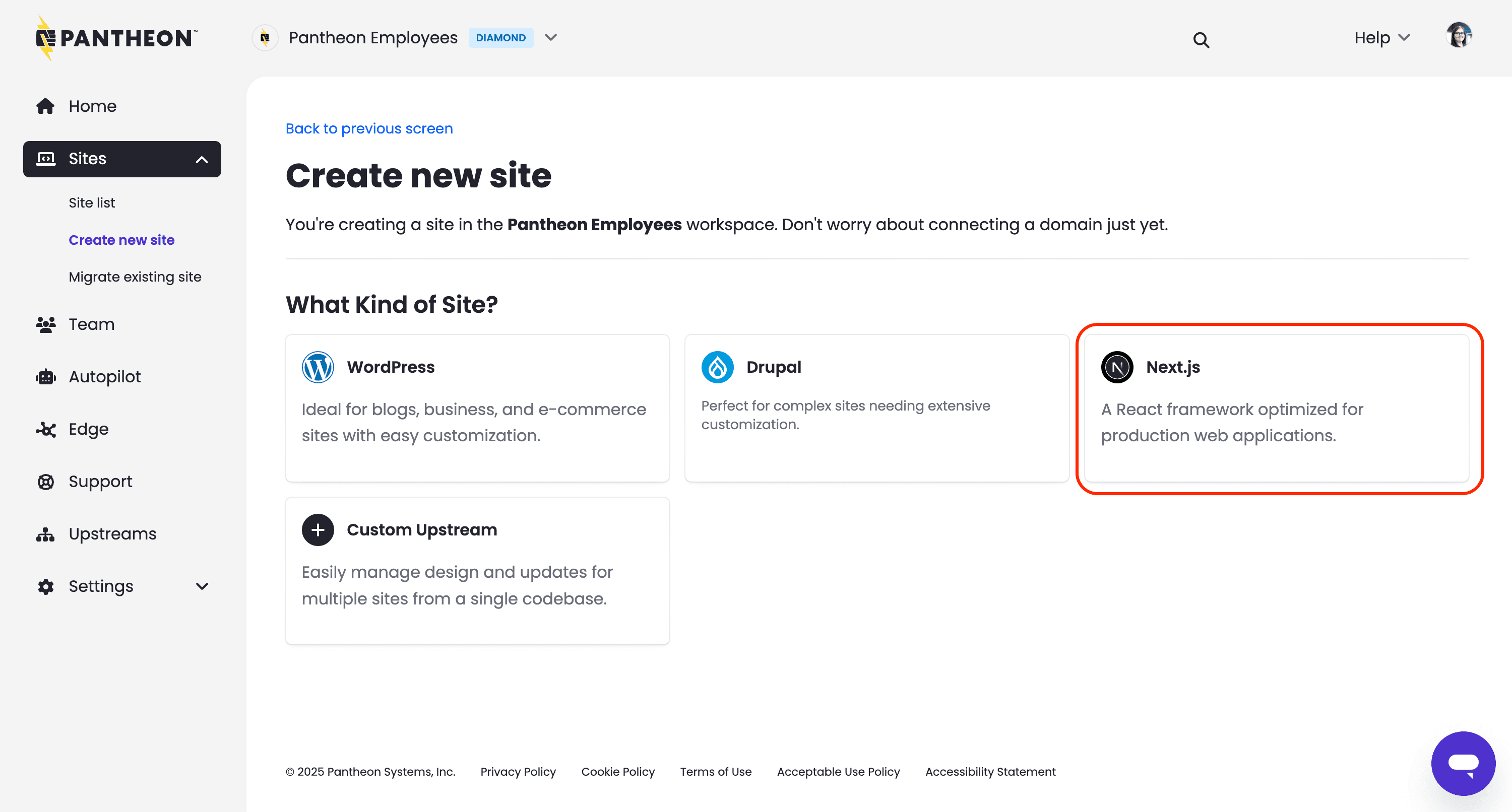
Support for creating Next.js sites is now generally available to Pantheon customers with Gold, Platinum or Diamond Workspaces. Previously, Next.js was restricted to a private beta program.

Create new site next.js from the Pantheon Workspace

Hosting for Next.js sites can be purchased at the same plan levels and pricing as WordPress and Drupal sites. Teams running a decoupled architecture in which Next.js reads content from a CMS on Pantheon must purchase two separate plans, though decoupling may allow WordPress or Drupal to run at a smaller plan level.

Since the beginning of our private beta program last November we have added many enhancements including:

For more perspective on this change to general availability, see the Pantheon blog. To learn how to run Next.js on Pantheon, read our documentation.