Pantheon release notes

Your destination for staying informed about our latest innovations and product updates.
Subscribe to RSS feed
Next.js
June 26, 2026

The Security tab is now available for Next.js sites in the Site Dashboard. You can password protect any environment with basic authentication, the same way you can for Drupal and WordPress sites. When an environment is locked, visitors are prompted for a username and password before the site is served.

To lock an environment, select the environment, open the Security tab, choose Locked, provide a username and password, and save. To make it public again, choose Public. For step-by-step instructions, see Lock Environments with the Dashboard Security Tool.

Run a new build after changing lock status

On Next.js sites, locking or unlocking an environment does not take effect until a new build is deployed to that environment. After you change the lock or unlock status in the Security tab, trigger a new build using the Rebuild option (available in the Site Dashboard and through Terminus) or by pushing a new commit to the connected branch, so the change is applied to the running site.

For more details about Next.js on Pantheon, see our Next.js documentation.

June 22, 2026

Pantheon now supports Bun as a package manager for Next.js sites, alongside npm, yarn, and pnpm. We've also added support for Node.js 26 (LTS).

Bun support

To use Bun, add a bun.lock file to your repository. Pantheon automatically detects the lock file and uses Bun to install your dependencies during the build process.

You can specify a Bun version in the engines.bun or packageManager field of your package.json. If no version is specified, Pantheon defaults to the latest stable release.

Node.js 26 support

Node.js 26 is now available as an LTS runtime for Next.js sites. Set the engines.node field in your package.json to use it:

Node.js 20 removed

Node.js 20 has reached end of life and is no longer available as a runtime. Sites using Node.js 20 must upgrade to Node.js 22 or later.

For more details about Next.js on Pantheon, see our Next.js documentation.

May 27, 2026

Pantheon will shut down infrastructure running our Front-End Sites offering on October 1st, 2026.

Our intention to replace the Front-End Sites was included in the Beta announcement of newer support for Next.js. As our support for Next.js reached General Availability, Pantheon staff began direct outreach to customers using Front-End Sites.

Please reach out to your Customer Success Manager if you would like assistance moving your site. Or, if you prefer to migrate on your own, you can do so with these steps.

April 14, 2026

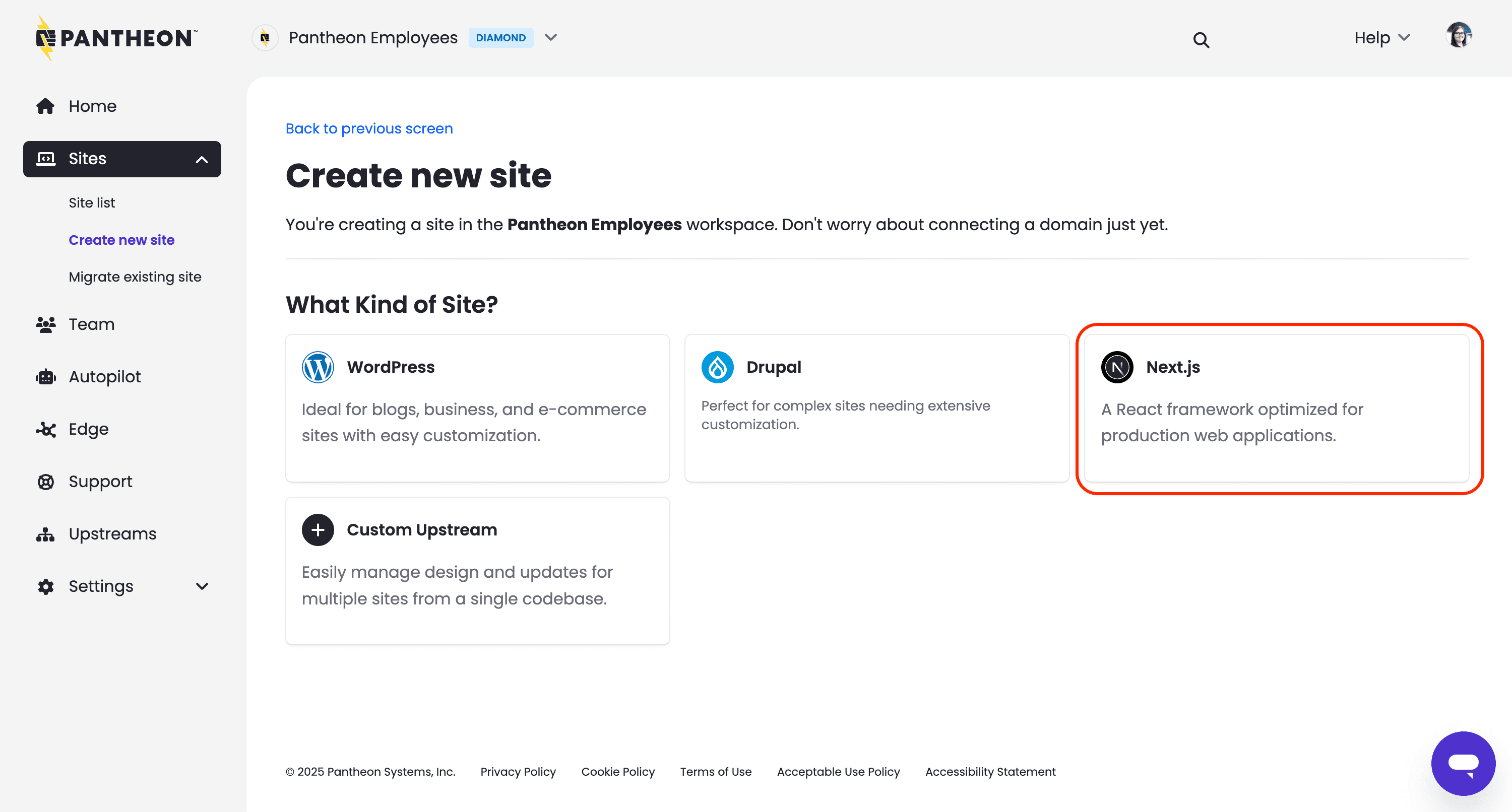
Support for creating Next.js sites is now generally available to Pantheon customers with Gold, Platinum or Diamond Workspaces. Previously, Next.js was restricted to a private beta program.

Create new site next.js from the Pantheon Workspace

Hosting for Next.js sites can be purchased at the same plan levels and pricing as WordPress and Drupal sites. Teams running a decoupled architecture in which Next.js reads content from a CMS on Pantheon must purchase two separate plans, though decoupling may allow WordPress or Drupal to run at a smaller plan level.

Since the beginning of our private beta program last November we have added many enhancements including:

For more perspective on this change to general availability, see the Pantheon blog. To learn how to run Next.js on Pantheon, read our documentation.

March 10, 2026

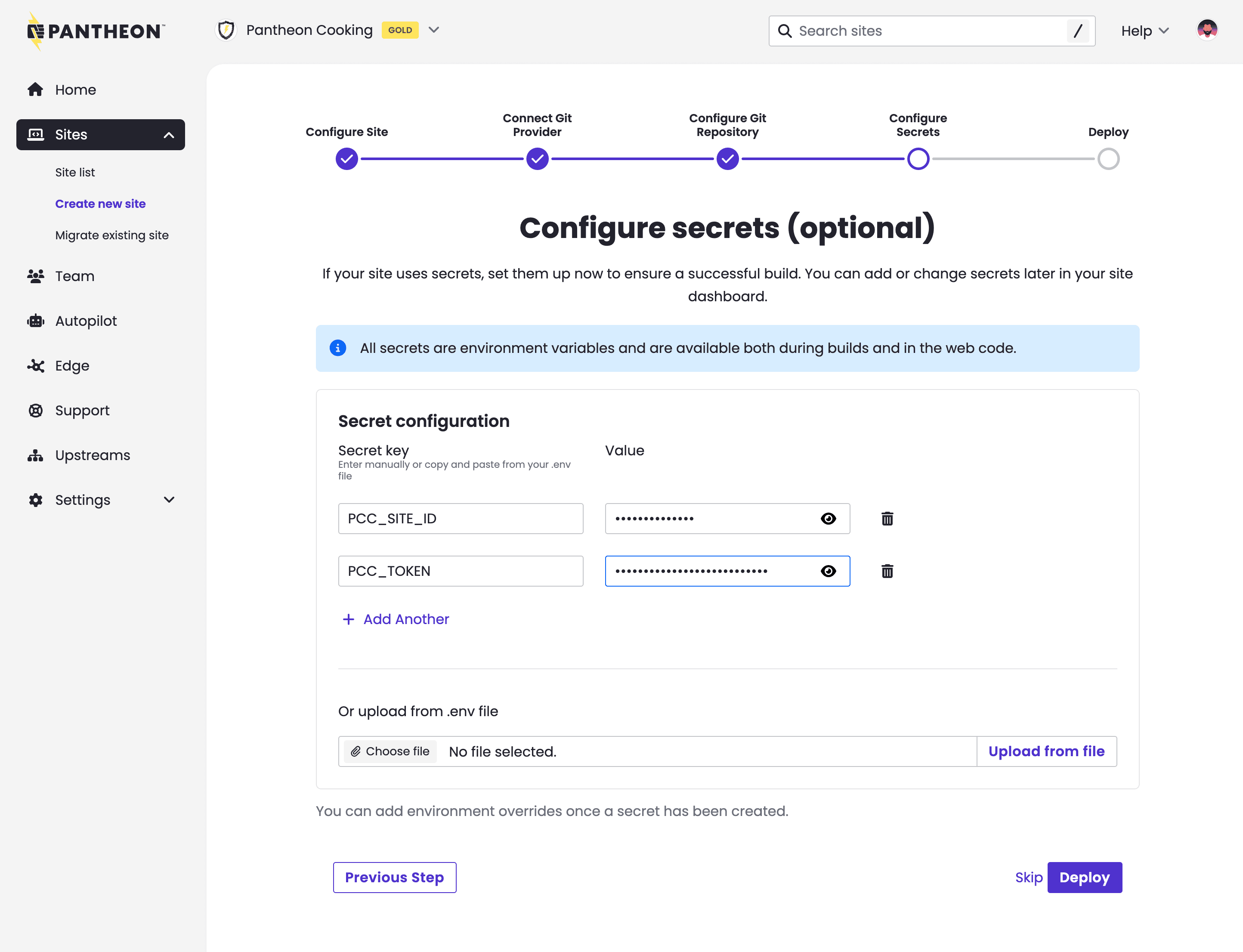
The Next.js site creation process now includes prompts for setting secrets at site creation time. This change benefits sites that need API tokens or other variables in order to build successfully. Previously, sites requiring these secrets would fail their automatic first build.

Setting secrets at site creation

Secrets set in this interface are stored securely using Pantheon's Secrets Manager.

The ability to set secrets at site creation time is valuable for anyone standing up our Content Publisher integration. See this updated tutorial that shows secret-setting at site creation.

March 3, 2026

Next.js 16 is now the default version for new site creation on Pantheon. When creating a new Next.js site, you will automatically get Next.js 16, the latest version of the leading React framework for building web applications.

What's New

Next.js 16 introduces Cache Components, moving the framework further in the direction of "dynamic by default" architecture. Pantheon's horizontally scalable container infrastructure with shared caches is well-suited to support this direction.

Creating New Sites

When you create a new Next.js site, it will default to Next.js 16. You can create sites via Terminus:

You can also create Next.js sites through the Pantheon Dashboard, which will automatically use Next.js 16.

Additional Information

For more details about Next.js on Pantheon, see our Next.js documentation.

February 26, 2026

The @pantheon-systems/nextjs-cache-handler package is now publicly available. It enables persistent caching on Pantheon's Next.js platform, so your cached data survives across deployments and server restarts.

Features

  • Works out of the box on Pantheon — The handler auto-detects your environment. No extra configuration needed beyond installing the handler in your Next.js application.
  • Full support for Next.js caching APIsrevalidateTag(), revalidatePath(), and ISR work as expected, including automatic CDN cache invalidation so your visitors see updates immediately.
  • Next.js 16 use cache support — Compatible with the new cacheHandlers API and 'use cache' directive introduced in Next.js 16.
  • Smart build deploys — When you deploy a new build, page caches refresh automatically while your data caches are preserved, avoiding unnecessary re-fetches from APIs and databases.
  • Local development friendly — Uses file-based caching in development so you can test caching behavior locally without any cloud dependencies.
  • Debug logging — Set CACHE_DEBUG=true to see detailed cache hit/miss/set activity for troubleshooting.

Getting started

Install the package:

Then configure your Next.js application to use the cache handler. For full setup instructions, usage examples, and configuration options, see the README on GitHub.

November 18, 2025

Today, Pantheon's new solution for Next.js enters Private Beta. To request an invite, submit this form.

Front-End Sites, our previous offering for Next.js, will be discontinued. We encourage users to migrate to the updated architecture.

For more information, see this related blog post.

What's new?

Some key changes for Next.js on Pantheon include:

  • Improved runtime architecture, including support for Pantheon's Global CDN.
  • Site creation via the command line or the dashboard.
  • Sites listed in your workspace alongside WordPress and Drupal, instead of a separate tab.
  • Unified site dashboard design that's consistent with WordPress and Drupal user interfaces: The Pantheon dashboard showing a dev environment for a Next.js site

For more detailed information on the differences from Front-End Sites, see our migration guide.

Documentation

For usage instructions and guidance, see the following new docs: