Pantheon release notes

Your destination for staying informed about our latest innovations and product updates.
Subscribe to RSS feed
March 11, 2026

Pantheon is announcing a PHP version removal schedule. The following PHP versions will be removed from the platform on September 30, 2026:

  • PHP 5.6
  • PHP 7.0
  • PHP 7.1
  • PHP 7.2 (End of Sale: May 1, 2026)
  • PHP 7.3 (End of Sale: May 1, 2026)
  • PHP 8.0 (End of Sale: May 1, 2026)

PHP 5.6, 7.0, and 7.1 are already end-of-sale. PHP 7.2, 7.3, and 8.0 will reach end-of-sale on May 1, 2026, meaning no new sites can be created with these versions after that date.

Additionally, PHP 8.1 will reach end-of-sale on September 30, 2026, with a removal date to be announced at least 9 months in advance.

What happens when a PHP version is removed?

Sites still running a removed PHP version will be automatically upgraded to the oldest available PHP version at the time of removal. If your site's software has not been updated for compatibility, this may result in broken functionality.

What to expect going forward

Pantheon will guarantee at least 9 months of advance notice before removing any PHP version from the platform. Refer to the PHP version lifecycle table for the latest schedule.

Action required

If your site is running PHP 5.6, 7.0, 7.1, 7.2, 7.3, or 8.0, upgrade to a recommended PHP version before September 30, 2026 to avoid disruption. We recommend PHP 8.3 or 8.4 for all production sites.

For guidance on upgrading, refer to Upgrade PHP Versions.
March 11, 2026

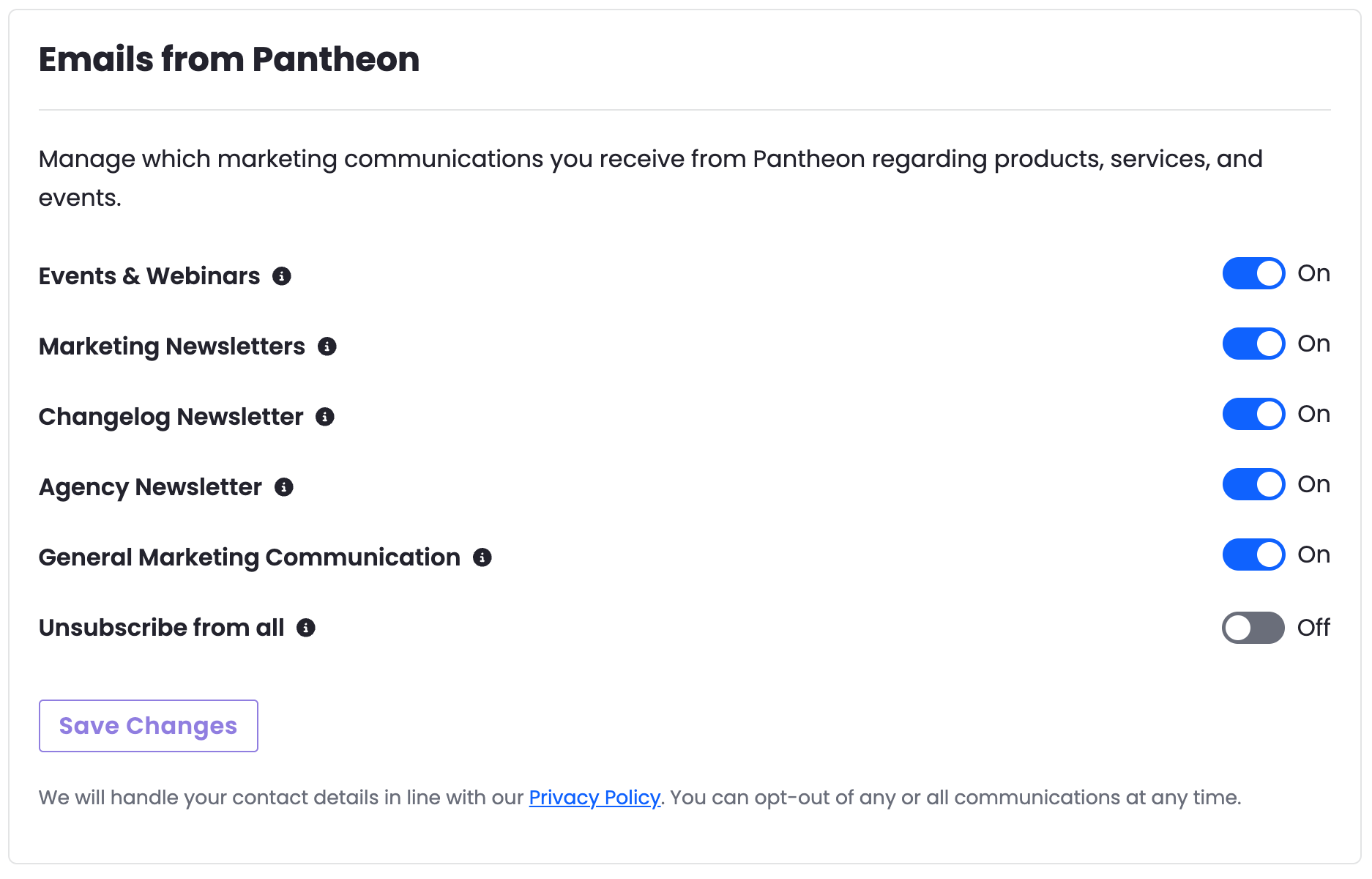
You can now manage your Pantheon marketing email preferences directly from the Pantheon Dashboard. Navigate to Personal Settings > Email Notifications to control which communications you receive from Pantheon, including newsletters, events, and product updates.

Email Notifications settings in the Pantheon Dashboard

Changes take effect after clicking Save Changes. You can update your preferences at any time.

March 11, 2026

Version 1.0.5 of the Pantheon Content Publisher Drupal module is now available. This release includes bug fixes and feature improvements.

What's new?

  • Approval workflow support — Content Publisher Drupal module now supports approval workflow, allowing administrators to review and approve the content before publishing.

For more details, refer to the release notes.

March 10, 2026

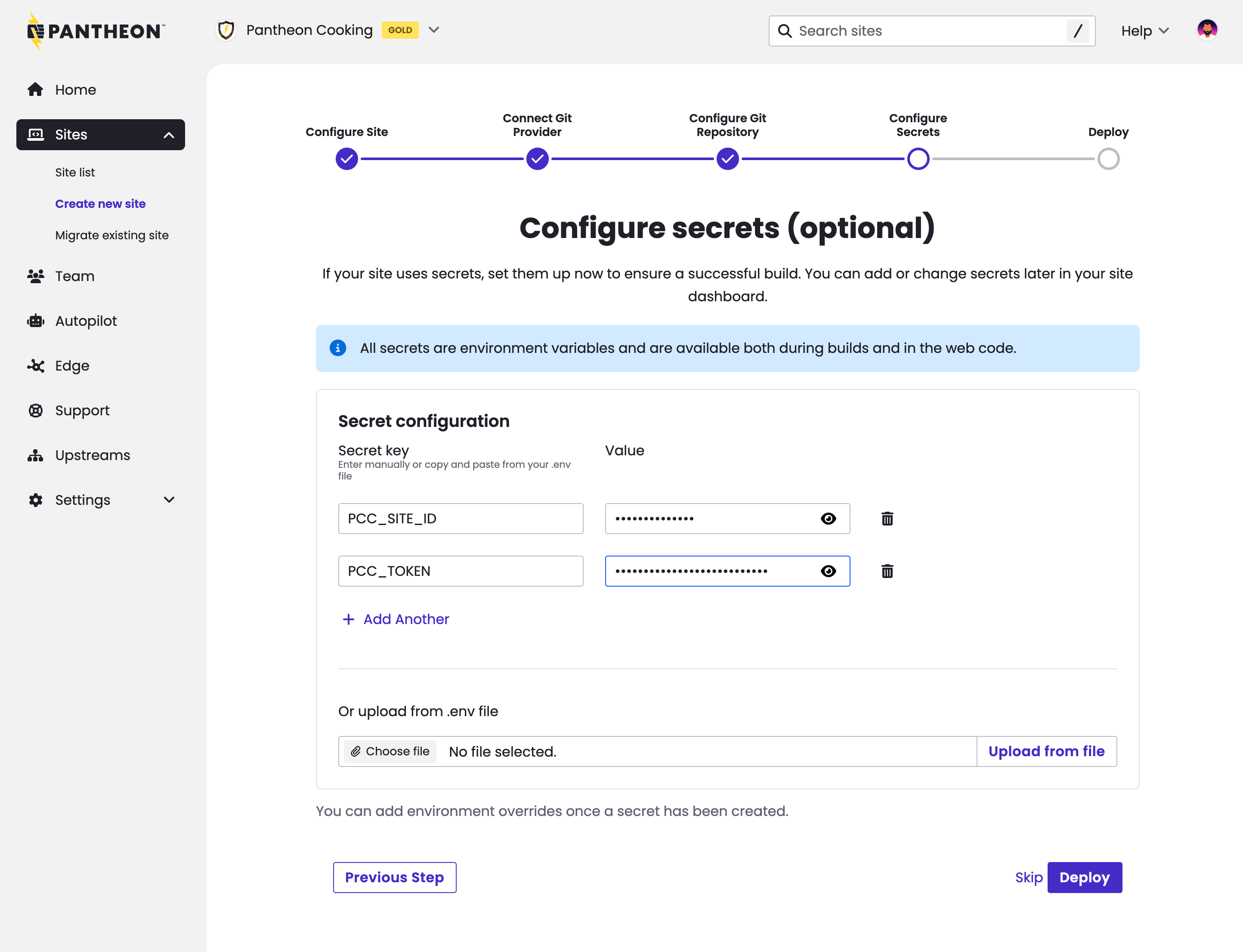
The Next.js site creation process now includes prompts for setting secrets at site creation time. This change benefits sites that need API tokens or other variables in order to build successfully. Previously, sites requiring these secrets would fail their automatic first build.

Setting secrets at site creation

Secrets set in this interface are stored securely using Pantheon's Secrets Manager.

The ability to set secrets at site creation time is valuable for anyone standing up our Content Publisher integration. See this updated tutorial that shows secret-setting at site creation.

March 10, 2026

The IBM i Access ODBC driver is now available in PHP Runtime Generation 2.

To connect, use odbc_connect()
For more information on available PHP extensions and runtime configuration, refer to the PHP Runtime Generation 2 documentation.

March 9, 2026

Pantheon has released version 2.3.1 of the WP SAML Auth WordPress plugin. This update adds a new filter for multisite environments to give developers more control over how SAML-provisioned users are added to sites. No action is required — existing behavior is unchanged.

What's new

  • Multisite user provisioning control — A new wp_saml_auth_auto_add_to_blog filter allows developers to prevent auto-provisioned SAML users from being automatically added to the current site. When set to false, users are created as network-level users without a role on any specific site, giving full control over site membership. The filter defaults to true, preserving existing behavior. See #465 for details.
Information:
Developer note

If you use the new wp_saml_auth_auto_add_to_blog filter and return false, the user passed to the wp_saml_auth_new_user_authenticated action will have no role on the current site. Any hooks relying on $user->roles being non-empty should account for this.

Update to 2.3.1 from the WordPress dashboard under Plugins > Installed Plugins, or download it from the WordPress Plugin Repository.

For more details, see the plugin changelog.

March 6, 2026

The Drupal CMS upstream has been updated to version 2. Newly created sites using the Drupal CMS upstream will now use Drupal CMS 2, which includes a curated set of modules and configuration designed to help you get started faster.

This update only applies to sites created with the Drupal CMS upstream. Sites using the Drupal 10 or Drupal 11 upstreams are not affected. Existing Drupal CMS sites are also not affected — refer to the Drupal CMS documentation for upgrade guidance.

Our documentation has instructions on how to configure a new Drupal CMS site.

March 6, 2026

Pantheon's Solr search Drupal module, search_api_pantheon, has been updated with two new releases — 8.4.0 and 8.4.1. These releases include significant architectural improvements and enhanced developer experience.

We recommend upgrading directly to 8.4.1.

What's Changed in 8.4.0

  • License corrected to GPL-2.0+ to align with Drupal standards.
  • Major code refactoring resulting in a 60% reduction in code length.
  • Simplified service architecture for better maintainability.
  • Removed unnecessary overrides for Guzzle, Endpoint, and the Solarium client.
  • Improved local development experience. Server connector configuration fields are now editable in local environments and automatically overridden when deployed to Pantheon.
  • Drush commands automatically use the first enabled server with the Pantheon connector. The server_id argument is no longer needed or accepted.

Dependency Updates:

  • Removed direct dependencies on guzzlehttp/guzzle, symfony/finder, symfony/yaml, and other packages now provided transitively through search_api_solr (these dependencies are still available but come through search_api_solr instead).
    • Impact: No action required unless custom code directly uses these services
  • Removed kint-php/kint dependency.

What's Changed in 8.4.1

  • Restored the search_api_pantheon_admin submodule (removed in 8.4.0) as an obsolete module to support smooth upgrades from earlier versions.

Action Required

  1. Back up your database before proceeding with the upgrade.
  2. Test thoroughly in a non-production environment before deploying to your live site.

Pantheon Search Server Migration

Since version 8.3.0, the default server ID is pantheon_search. New installations use this automatically. Existing sites upgrading from earlier versions can migrate from pantheon_solr8 to pantheon_search via an update hook.

If you proceed with migration, the update hook will update the server ID from pantheon_solr8 to pantheon_search, reassign all indexes to the new server, and flag content for reindexing.

After running database updates (drush updb), reindex your content:

To opt out of migration and continue using pantheon_solr8, add this to your settings.php before running database updates:

Upgrade Instructions

For detailed installation and upgrade instructions, please refer to:

Important: Version Support

Version 8.4.x is now the only maintained version; support for 8.3.x and 8.2.x has been discontinued.