
Pantheon release notes

Your destination for staying informed about our latest innovations and product updates.
Subscribe to RSS feed

Security
October 6, 2026

The latest security release for WordPress, 7.1.3, is available on Pantheon.

Action required

Because this is a security update, we recommend all users upgrade to WordPress 7.1.3 as soon as possible from your Pantheon dashboard or Terminus to access the latest features, fixes, and security enhancements. See related documentation for how to apply core updates.

Pantheon has deployed a platform-wide mitigation (virtual patching via our routing network) against external abuse of the stored XSS on the Comments administration page, and is actively monitoring that rule. However, customers need to update their sites as soon as possible.

Highlights

This release resolves seven security vulnerabilities:

  • A stored XSS on the Comments administration page, exploitable via pending comments.
  • A DoS issue in the WP_Http::make_absolute_url() method.
  • A second-order SQL injection in WordPress WXR export.
  • A weakness allowing Author role users to sticky posts.
  • Unauthenticated disclosure of comments on private and unpublished posts.
  • Imgur embeds are vulnerable to XSS.
  • Forgeable parameters passed to the {status}_{type} hook can lead to action name collision.

For full details, see the WordPress 7.1.3 release notes and WordPress documentation.

September 30, 2026

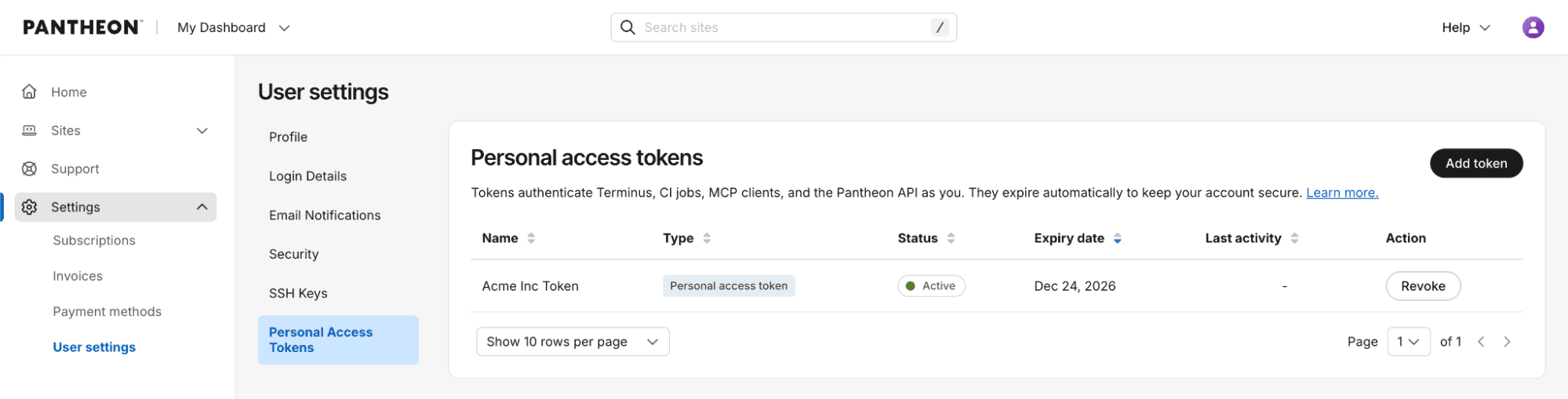
Pantheon is renaming machine tokens to personal access tokens (PATs) and adding stronger security controls with automatic expiration.

What’s changed

  • Time-bound credentials: New PATs expire 90 days after creation, reducing the risk of credentials that remain valid indefinitely.

What hasn’t changed

  • Continue using the same Terminus flow and commands for authentication, listing, and deleting tokens.
  • Continue to create and revoke tokens in the dashboard under your User settings.

What this means for legacy machine tokens

Existing machine tokens continue to work and are not changed by this release. No immediate action is required. Machine tokens are now considered a legacy authentication method, so we recommend using personal access tokens for new integrations and workflows.

If you adopt a PAT, plan to renew it every 90 days and update the corresponding secret wherever the token is used.

Get started

Create a new personal access token from User settings → Personal Access Tokens, copy it once, store it securely, and use it with your existing Terminus authentication workflow.

Dashboard interface showing new personal access tokens

For more details, see related documentation.

September 25, 2026

PHP versions 8.2.34, 8.3.35, 8.4.26, and 8.5.11 are now available on the platform. These updates include important security fixes, along with bug fixes and enhancements that improve performance and stability.

The security fixes include a high-severity issue in the SOAP extension (CVE-2026-91765), plus fixes in OpenSSL certificate verification, the HTTP stream wrapper, and PHP-FPM.

Updates will be applied automatically over the next few days, so no manual action is required. See PHP versions on Pantheon to check or change your site's PHP version.

September 22, 2026

The latest security release for WordPress, 7.1.2, is available on Pantheon.

Action required

Because this is a security update, we recommend all users upgrade to WordPress 7.1.2 as soon as possible from your Pantheon dashboard or Terminus to access the latest features, fixes, and security enhancements. See related documentation for how to apply core updates.

Pantheon has pre-deployed platform-wide mitigations (virtual patching via our routing network) against external abuse of this vulnerability (CVE-2026-87902), and is actively monitoring those rules. However, customers need to update their sites as soon as possible.

Highlights

This release resolves one critical severity vulnerability (CVE-2026-87902) that does not require authentication to exploit. Under certain server and theme conditions, an unauthenticated attacker can cause page template resolution to include a chosen readable local PHP file outside the active theme directories, which could potentially lead to remote code execution.

For full details, see the WordPress 7.1.2 release notes and WordPress documentation.

September 18, 2026

The latest security release for WordPress, 7.1.1, is available on Pantheon.

Action required

Because this is a security update, we recommend all users upgrade to WordPress 7.1.1 as soon as possible from your Pantheon dashboard or Terminus to access the latest features, fixes, and security enhancements. See related documentation for how to apply core updates.

Pantheon has pre-deployed platform-wide mitigations (virtual patching via our routing network) against external abuse of some of these vulnerabilities, and are actively monitoring those rules. This includes an unauthenticated stored cross-site scripting vulnerability (CVE-2026-93485), reported through Patchstack's Vulnerability Disclosure Program, which was already covered by these mitigations ahead of the release. However, customers need to update their sites as soon as possible.

Highlights

This release resolves 11 security vulnerabilities, most requiring an authenticated role (Contributor or above) to exploit. WordPress has not assigned CVE identifiers to these issues.

For full details, see the WordPress 7.1.1 release notes and WordPress documentation.

September 3, 2026

Version 0.9.4 of the 'Push to Pantheon' GitHub Action is now available. This release fixes a command injection issue in the git_commit_message parameter, adds branch-based Multidev naming, and lets you name the GitHub deployment environment separately for each site.

Action required

Versions 0.9.0 through 0.9.3 interpolated the git_commit_message value into a shell string and evaluated it, so shell metacharacters in the message ran as commands rather than being passed as text. Arbitrary commands, passed through the git_commit_message could run on the GitHub Actions runner, which holds your PANTHEON_MACHINE_TOKEN and PANTHEON_SSH_KEY.

Only workflows that pass text into git_commit_message that someone else could control (e.g. via a PR title or branch name) are affected, and only on a site that has a Live environment and the workflow does not set skip_build_tools: true (e.g. uses the default behavior). The commit message the action generates on its own by default contains no such text, so default configurations are not affected. Versions earlier than 0.9.0 pass the message as a single quoted argument and are also unaffected.

Upgrade to 0.9.4 as soon as possible. If you cannot upgrade immediately, ensure you are not passing untrusted text into git_commit_message.

Reported by @ndewhurst. (#175)

Additional key improvements in this release

  • Branch-based Multidev naming: Set target_env_strategy: branch to name the Multidev after your branch instead of pr-[NUMBER]. Branch names are normalized to satisfy Pantheon's naming rules — lowercased, unusable characters folded to hyphens, and trimmed to 11 characters — and a digit is appended when another branch already holds that name. (#183)
  • Per-site GitHub deployment environments: Set deployment_environment to name the GitHub deployment environment separately from the Pantheon environment. Without it, a branch that deploys to several Pantheon sites reports every deployment under the same name, so only the most recent one stays visible in the pull request timeline. (#182)
  • Multiline commit messages: git_commit_message now accepts multiline values, so you can pass Git trailers such as Source-Commit: to record where a deployment came from. (#175)
  • More reliable Multidev cleanup: delete_old_environments: true now removes environments for closed pull requests that Terminus Build Tools misses. Build Tools stops paginating after roughly 200 pull requests, so environments for older closed pull requests remained until the site reached its Multidev limit. (#174)
  • Multidev limit reported for named environments: The Multidev limit check now runs when you set target_env explicitly. Previously it ran only for automatically derived names, so a deployment to a named environment failed inside Terminus instead of reporting the limit. (#176)

Changes to existing behavior

target_env is now validated against Pantheon's environment naming rules. A value Pantheon would reject (uppercase letters, underscores, more than 11 characters, or a reserved name such as master) now fails immediately with an explanation instead of failing later in Terminus.

How to upgrade to 0.9.4

Update your workflow file to use 0.9.4:

For more information about this release, visit the GitHub release page (https://github.com/pantheon-systems/push-to-pantheon/releases/tag/0.9.4). To learn more about deploying to Pantheon from GitHub, see GitHub Actions (/github-actions).

If you have questions or concerns about the action, please use the 'Push to Pantheon' issue queue (https://github.com/pantheon-systems/push-to-pantheon/issues).

August 20, 2026

Integrated Composer runs composer audit on every build to check your dependencies against known security advisories.

  • Dev and Multidev: Builds always succeed, even if advisories are found.
  • Test: Deploying to Test fails if the latest Dev build has open advisories you haven't explicitly acknowledged.
  • Live: Not audited directly, but blocked transitively, since Live only receives code by deploying from Test.

Action required

If a deploy to Test fails because of a security advisory, update the affected package where possible. When you can't update right away, you can tell Composer to stop flagging specific advisories using the config.policy block in composer.json, while keeping a version-controlled record of what you've accepted and why.

See Handling security advisories for how the check works and how to manage your own list of exclusions.

August 19, 2026

As part of Pantheon's Long-Term Support (LTS) for Drupal 7, Drupal 7.106 is now available with a backported security patch.

This release backports the fix for SA-CORE-2026-010, an information disclosure vulnerability in the Image module. Image style derivatives stored on file schemes other than the core private scheme could be served without the access checks intended for access-restricted images.

Action required

Apply the latest upstream update to your Drupal 7 site to receive this fix. See related documentation for how to apply core updates.

About Drupal 7 Long-Term Support

Pantheon has partnered with Tag1 Consulting to deliver security updates and maintenance for Drupal 7 sites. This extended support is included at no additional cost.

For configuration guidance and detailed information, visit our related documentation.