Pantheon release notes

Your destination for staying informed about our latest innovations and product updates.
Subscribe to RSS feed
User interface
February 23, 2026

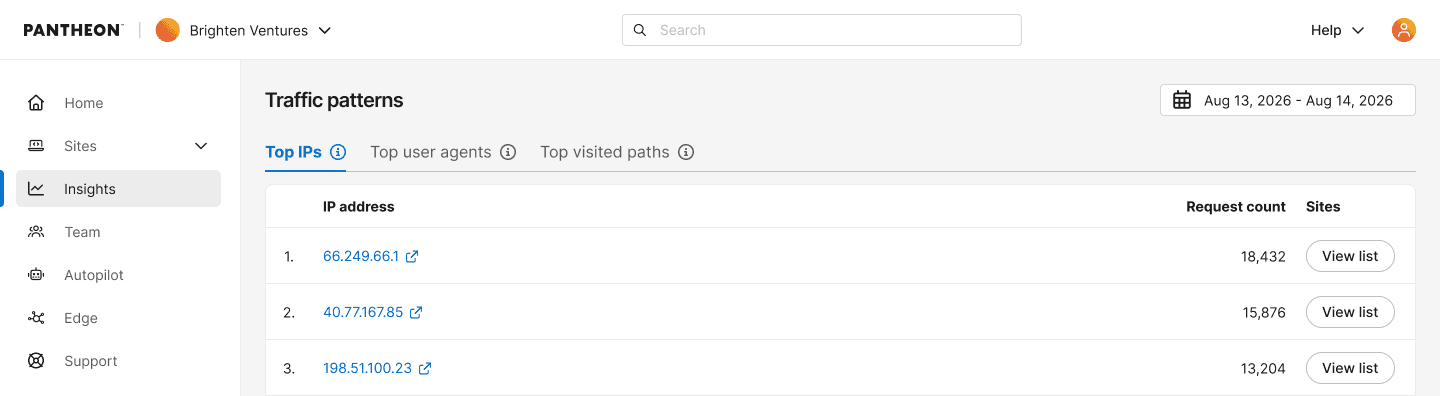
We’ve updated the Top Traffic Patterns interface, located in the Metrics tab of your Live environment dashboard, to give you deeper visibility into your site's traffic. You can now see the exact request count alongside each of the metrics IPs, User Agents, and Paths.

By surfacing the exact volume of requests, it is much easier to measure the true impact of specific actors or pages. These counts help you confidently decide if an aggressive scraper warrants being blocked, or exactly how much load a highly visited path is handling so you can accurately prioritize your caching and optimization efforts.

Note: The Top Traffic Patterns feature is in active, iterative development. You can expect frequent updates and new enhancements in the near future.

metrics page now shows request count

February 4, 2026

A new user interface is now available in the Metrics tab of the Live environment of site dashboards, named Top traffic patterns which reports the following new traffic metrics:

  • Top IP addresses
  • Top user agents
  • Top visited URL paths

With this data, you can identify aggressive crawlers or scrapers, that you may want to block manually or prioritize caching and optimization efforts based on the specific pages receiving the highest request volume.

Note: This data includes both counted and uncounted visits.

metrics page showing tables with top ips, user agents, and visited paths

January 26, 2026

Teams using Pantheon's Secrets Manager to set variables like API tokens can now do so through the site dashboard. Previously this feature only had a command line user interface through a Terminus plugin. Secrets Manager works with WordPress, Drupal, and Next.js sites hosted on Pantheon. It does not work with the sunsetting Front-End Sites product.

Secrets Managers encrypts values at rest and then makes them available to your application's code as it runs. Secrets Manager is suitable for setting variables that are truly sensitive like a password, token, or key that allows Next.js to read from a back-end CMS as well as variables that might not be sensitive like a Google Tag Manager ID.

What's new?

  • Create new site-owned secrets from the site dashboard
  • Create new site-owned secrets in bulk from the site dashboard by either:
    • manually adding multiple keys at once of the same type and scope
    • or importing secrets from .env files (e.g., Next.js sites)
  • Manage existing site-owned secrets from the site dashboard:
    • Edit default secret value and/or secret scope
    • Add/edit/delete environment overrides

For details, see related documentation.

A list of secrets for a site, displayed in the Pantheon dashboard

December 10, 2025

The new Site Dashboard is now available for all Workspaces. Today's release switches Personal Workspaces over to the new experience, a change we recently completed for Professional Workspaces.

The following ON/OFF toggles have been removed from the user interface:

  • Personal Workspace > Site list "Open sites in new beta"
  • Professional Workspace > Site list "Open sites in new beta" (removed in a previous release)
Information:
Note

The following highlights what users can expect in the new experience. Note these items have not been added or impacted by todays change but were delivered by our earlier Beta release.

  • Same functionality, familiar workflows – No need to relearn anything. Your day-to-day tasks remain unchanged.
  • Modern, accessible design – We’ve made significant improvements to align with the latest usability design standards, enhancing readability, contrast, and navigation.
  • Performance improvements under the hood – While this may feel mostly visual, we’ve reworked key infrastructure for long-term speed and reliability.
  • Small but powerful UX upgrades – New conveniences like one-click to copy the commit SHA, along with other thoughtful touches for enhanced usability.

Shows a preview of the new/fresh commit log

December 5, 2025

A refreshed, modernized site migration experience is now available in the Pantheon Dashboard for all users.

Share questions and feedback in the Pantheon Community Slack.

Migration interface for WordPress

Key Changes

  • Design improvements to align with the latest usability standards for increased consistency.
  • The previous Drupal migration process (which leveraged drush ard) led to failures for most users. The Drupal migration process has now been streamlined so that, when the site deployment is complete, users are instead prompted to migrate manually with crosslinks to respective docs for each step.

Manual migration prompts in the dashboard

November 18, 2025

Starting today, the new Site Dashboard enters General Availability for Professional Workspaces. Specfically, this release changes the following for Professional Workspaces:

  • The new experience is now the default, previously it could be enabled and disabled.
  • The option to disable the new experience has been removed.

Personal Workspaces are not impacted, and still require opting in to enable the new experience.

Information:
Note

The following highlights what users can expect in the new experience. Note these items have not been added or impacted by todays change but were delivered by our earlier Beta release.

  • Same functionality, familiar workflows – No need to relearn anything. Your day-to-day tasks remain unchanged.
  • Modern, accessible design – We’ve made significant improvements to align with the latest usability design standards, enhancing readability, contrast, and navigation.
  • Performance improvements under the hood – While this may feel mostly visual, we’ve reworked key infrastructure for long-term speed and reliability.
  • Small but powerful UX upgrades – New conveniences like one-click to copy the commit SHA, along with other thoughtful touches for enhanced usability.

Shows a preview of the new/fresh commit log

November 4, 2025

A refreshed, modernized site creation experience is now available in the Pantheon Dashboard for all users.

Share questions and feedback in the Pantheon Community Slack.

New user interface showing the creation of a WordPress site in the dashboard

Key Changes

  • The process and workflow is the same, with fewer “loading” screens.
  • Design improvements to align with the latest usability standards.
  • Previously, errors were checked after form submission. Now, errors are checked as you type.
  • Previously, after deployment completed, only a single button was shown for opening the new site dashboard. In the new experience, we've added next steps in context with relevant documentation links: New user interface showing the completion of deploying a new WordPress site in the dashboard
October 23, 2025

The following updates are now available for Content Publisher:

  • New release of the Pantheon Content Publisher v1.0.3 Drupal module now availabe.
  • With Approval Workflows enabled, Administrators now have the option to Approve submissions direclty from the Pending approval tab of a Collection in the Content Dashboard. Previously, opening each submission in Preview mode was required.
  • The experience for Smart Components has been improved for first time users.
  • Upgrade Content Publisher AI metadata suggestion to use Gemini 2.5 flash instead of Gemini 2.0.
  • Bug fix for our Next.js starter kit and SDK to properly support Next.js 15.5 and the use of App Router. Improve the build process by using pinned versions of dependencies.
  • Fix several event tracking issues in the back-end.