Pantheon release notes

Your destination for staying informed about our latest innovations and product updates.
Subscribe to RSS feed

Deprecated
November 16, 2026

Starting February 15, 2027, Pantheon will block Terminus versions that have reached end of life (EOL) from connecting to the platform. The initial affected versions are:

Terminus versionEOL dateBlocked starting
4.1.3February 2, 2027February 15, 2027
4.1.1January 29, 2027February 15, 2027
4.1.0November 4, 2026February 15, 2027
4.0.3September 29, 2026February 15, 2027
4.0.2September 11, 2026February 15, 2027
4.0.1September 5, 2026February 15, 2027
4.0.0May 19, 2026February 15, 2027
3.6.2May 7, 2026February 15, 2027
3.6.1March 03, 2026February 15, 2027
3.6.0 or earlierDecember 05, 2025February 15, 2027

Upcoming EOL and block dates for other versions

Versions still in support will be blocked on their EOL date. These dates have already been published and are unchanged:

Terminus versionEOL and block date
4.3.5November 9, 2027
4.3.4November 9, 2027
4.3.3November 3, 2027
4.3.2August 20, 2027
4.3.1June 23, 2027
4.3.0June 2, 2027
4.2.2May 26, 2027
4.2.1May 13, 2027
4.2.0April 30, 2027
4.1.9April 13, 2027
4.1.8April 8, 2027
4.1.7March 30, 2027
4.1.6March 23, 2027
4.1.4March 18, 2027

See Supported Terminus and PHP Versions for the current schedule.

Action required

Upgrade to the latest version of Terminus before February 15, 2027. To check which version you’re running, use terminus --version. For update steps on macOS (Homebrew), Windows and Linux (PHAR), see Install and Update Terminus.

If you are using Terminus in CI with GitHub Actions, we recommend using the Terminus GitHub Action, which always installs the latest version by default.

Why we're making this change

Pantheon set the EOL schedule for Terminus several years ago, but up until now has not enforced the requirement to use supported Terminus versions. Terminus runs on your computer or in your CI environment, so Pantheon can’t remove an old version. Customers who continue to use EOL versions of Terminus cause friction for security and support, as the interaction of some older versions with the platform can be unpredictable. Ensuring that Terminus clients in the field remain up to date will allow Pantheon to strengthen platform security and compliance, and evolve the platform more smoothly.

What happens when a version is blocked?

Commands run with a blocked Terminus version will fail to connect to Pantheon. Newer versions of Terminus will display a message asking you to upgrade. Older versions may not display the message, so automated processes, such as CI jobs, will simply fail until Terminus is upgraded.

What to expect going forward

  • Pantheon will announce each Terminus block at least 90 days in advance and will send reminders multiple times as the block date approaches.
  • Beginning with Terminus 4.3.5, each version will be supported for six months after the next version is released, down from one year. To prevent a newer version from reaching EOL before an older one, new versions will share the previous version's EOL date until the six-month window is reached. After that, the EOL date is the block date.
  • Dates already published are unchanged.
September 29, 2026

Pantheon is announcing that, as of December 31, 2026, PHP version 7.4 will enter End of Sale. As a result, no new sites can be created with this version after that date.

What happens to existing sites when a PHP version reaches End of Sale?

Existing sites running an end-of-sale PHP version will not be affected. Pantheon will continue to apply security patches for PHP 7.4 where available for the duration of End of Sale.

What to expect going forward

In the future, we expect to transition PHP 7.4 to End of Support status. When this happens, this version will no longer be supported by PHP maintainers, nor will Pantheon provide ongoing updates from our contracted vendors. Customers will assume additional security risk by staying on these versions. Pantheon commits to providing at least 90 days advance notice to customers before transitioning a version of PHP to End of Support.

Action required

If your site is running PHP 7.4, we encourage you to upgrade it to a current PHP version. We recommend PHP 8.3 or 8.4 for all production sites.

For guidance on upgrading, refer to Upgrade PHP Versions.

February 28, 2025

Editorial note: The date for when this change will occur was originally published as March 1, 2025 but has since been updated to March 3, 2025.


To improve API security, New Relic will retire legacy REST API keys on March 3, 2025. These keys are used to access REST API v2 endpoints. To continue to utilize these endpoints, you will need to generate a new API Key. You can read more about this end-of-life in this Forum post.

How to check if you're affected

Not all accounts use REST API keys. To check if you need to take action:

  1. In New Relic, click on your profile icon (bottom left) and select API Keys.
  2. Click REST API Key on the right side of the page.

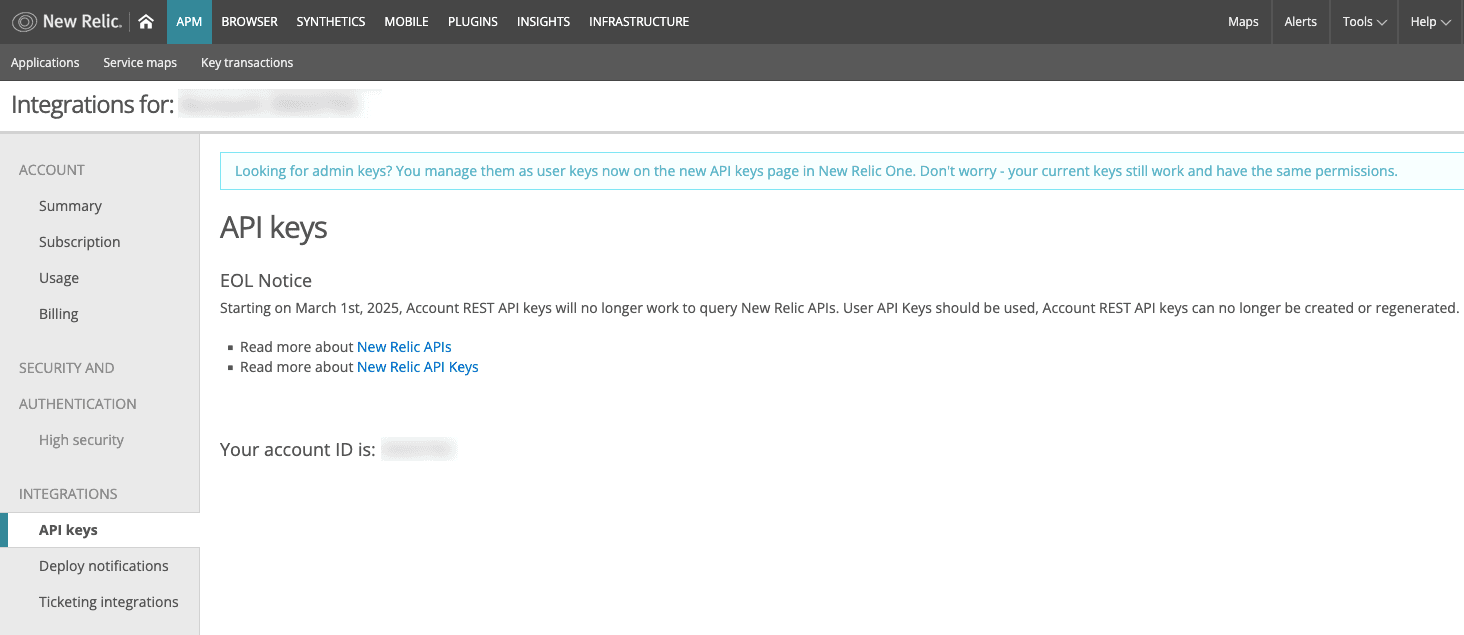
This will load the legacy New Relic UI. The following image is an example of an account that does not have a REST API key associated with it.

Example New Relic integrations API keys page without any keys

  1. If a key is listed, your account uses a REST API key. If no key appears, your account is unaffected.

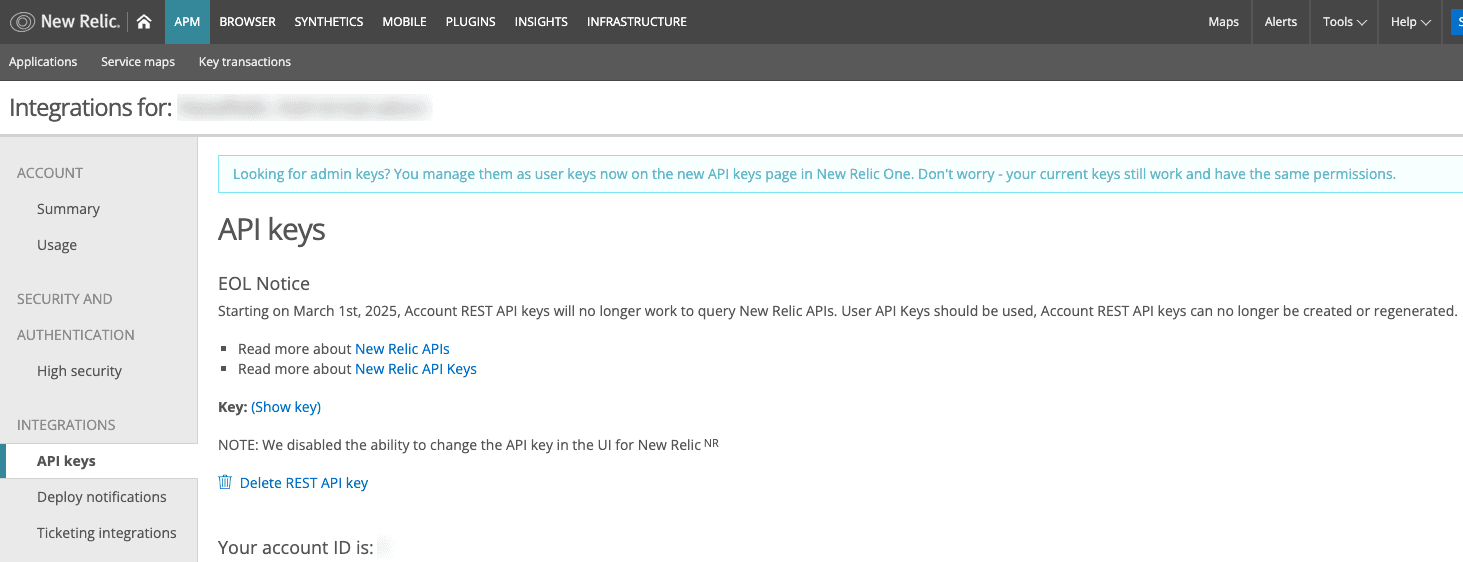
The following image is an example of an account that has a REST API key associated with it. Note that when present, you have options to show the key (which will show the first few characters, not the entire key) and delete it.

Example New Relic integrations API keys page with keys

Tip: REST API keys start with the prefix NRAA or a random combination of letters and numbers.

What to do if you have a REST API key

  1. Create a new user API key — this can be done in the New Relic UI or via NerdGraph.
  2. Replace the old REST API key with the new user API key in your environment.

What happens if you don’t update your keys by March 3rd?

If you don’t replace the old keys by the deadline, any workflows relying on these keys will stop functioning as intended. Generating a new key and replacing the old key will restore functionality.

April 17, 2024

Pantheon is updating our platform access control, requiring the use of SSH keys starting April 30, 2024. Connecting to and interacting with remote Pantheon environments via your Pantheon dashboard credentials will be disabled.

You'll still login to the Pantheon dashboard in the browser with your username/password or Single Sign-On, but connecting to and interacting with a given Pantheon site environment will require an SSH key.

This applies when connecting to Pantheon containers from the terminal (Git, SFTP, rsync, Drush, WP-CLI) as well as local applications like SFTP clients (Filezilla and Cyberduck).

We are making this change to maintain a secure and reliable platform. Learn how to configure your SFTP client with SSH keys in our documentation.

July 1, 2023

In Pantheon's continual efforts to stay up to date with modern web security standards, Pantheon is removing support for a certain set of cipher suites for TLS 1.2. By removing support for specific TLS 1.2 ciphers, Pantheon is enhancing overall platform security. This change ensures that the websites hosted on Pantheon will only use stronger and more secure encryption protocols, which helps protect sensitive information transmitted between users and the websites.

The following obsolete TLS 1.2 ciphers have known vulnerabilities and have been removed:

  • TLS_ECDHE_RSA_WITH_AES_128_CBC_SHA
  • TLS_ECDHE_RSA_WITH_AES_128_CBC_SHA256
  • TLS_ECDHE_RSA_WITH_AES_256_CBC_SHA
  • TLS_ECDHE_RSA_WITH_AES_256_CBC_SHA384
  • TLS_RSA_WITH_AES_128_CBC_SHA
  • TLS_RSA_WITH_AES_128_GCM_SHA256
  • TLS_RSA_WITH_AES_256_CBC_SHA

Pantheon has proactively identified and communicated with affected customers. No action is required at this time, but if you have any questions/concerns, please feel free to reach out to your Account Team at Pantheon or to Pantheon Support via a ticket or chat.

January 1, 2022

As part of our end-of-life plan to retire the Legacy Edge, CNAMEs edge.live.getpantheon.com and styx-01.pantheon.io now point to Global CDN.  This change allows for the transition of sites to Global CDN with minimal interruption. Permanent shutdown happens on February 1, 2022.

February 1, 2018

On March 5th, the cost for legacy load balancers increased from $30/month to $60/month. To avoid increased charges, upgrade to the Global CDN, which includes free, automated HTTPS, by updating DNS records.

July 1, 2016

In keeping with the recommendations of PCI DSS, we no longer support TLS 1.0 for customer sites. Older browsers and mobile devices that do not support TLS 1.1 and 1.2 will likely experience problems and security vulnerabilities. If you need to continue support for TLS 1.0, you can do so with Cloudflare. For details, see Cloudflare's documentation.